













 AIIllustrative image: AI-generated
♾️ 9 best infinite scroll plugins for WordPress 2026 (free and paid)
Infinite scroll keeps readers on the site longer than classic pagination. But poorly configured infinite scroll is frustrating: jerky loading, lost footer, broken navigation. A good plugin solves these problems out of the box.
We selected 9 tools for WordPress that actually work: they don't slow down the site, work well with WooCommerce and Elementor, and don't require tons of code. We checked each for compatibility with the latest version of WordPress and relevance in 2026.
💡 Quick overview:
- Ajax Load More: if you need maximum flexibility and custom output templates
- Load More Products for WooCommerce or YITH Infinite Scrolling: for WooCommerce online stores
- Catch Infinite Scroll: when you need simple infinite scroll without dozens of settings
- Jetpack: if infinite scroll is needed as part of an ecosystem (security, backups, statistics)
Comparison table
Plugin | Free version | WooCommerce | Elementor | WP.org rating | Active installations |
|---|---|---|---|---|---|
Ajax Load More | ✅ | ✅ (add-on) | ✅ (add-on) | 4.8/5 | 40,000+ |
YITH Infinite Scrolling | ✅ | ✅ | ❌ | 4.0/5 | 10,000+ |
Jetpack | ✅ | ❌ | ❌ | 3.9/5 | 5M+ (entire Jetpack) |
Catch Infinite Scroll | ✅ | ❌ | ❌ | 4.5/5 | 10,000+ |
WooCommerce IS & Ajax Pagination | ❌ ($17) | ✅ | ❌ | CodeCanyon | - |
Infinite Scroll and Ajax Load More | ✅ | ❌ | ❌ | 5.0/5 | 1,000+ |
Animated Infinite Scroll | ❌ ($15) | ✅ | ❌ | CodeCanyon | - |
Post Grid with Ajax Filter | ✅ | ❌ | ❌ | 4.8/5 | 3,000+ |
Load More Products for WooCommerce | ✅ | ✅ | ❌ | 4.7/5 | 20,000+ |
1. Ajax Load More
The most powerful infinite scroll plugin for WordPress. You create a query through a visual shortcode builder, specify content type, taxonomies, authors, and the plugin loads results via Ajax as you scroll. No code needed.
Under the hood: support for masonry grids, Repeater Templates for output customization, prefetching the next batch of posts into memory before the user scrolls down. Version 8.0.0 added integration with Query Loop blocks, now it hooks into the native editor.
Pros:
- Full control over WP_Query: post type, categories, tags, date, authors, any parameters
- Dozens of add-ons: caching, WooCommerce, Elementor, SEO pagination, filters
- Repeater Templates, you can layout output however you want, independent of the theme
- 40,000+ active installations and 12 years of active development
Cons:
- Pro version with add-ons is noticeable in the budget: cost depends on the add-on bundle
- A short shortcode looks simple, but fine-tuning requires reading documentation
Price: free Lite version on WordPress.org, Pro bundle from $150/year for all add-ons, individual add-ons from $59/year.
🔗 Ajax Load More on WordPress.org🔗 Developer site
2. YITH Infinite Scrolling

YITH Infinite Scrolling is tailored for continuous experience: three modes to choose from (classic infinite scroll, Load More button, Ajax pagination) plus automatic URL updates when loading new elements. Works well with WooCommerce, you can enable infinite scroll on shop pages, blog and even comments.
The plugin updates steadily, the latest version 2.8.0 was released in May 2026. Works with WPML and Loco Translate, critical for multilingual projects.
Pros:
- Three navigation modes in one: infinite scroll, Load More, Ajax Pagination
- Native integration with WooCommerce, no separate add-on required
- Automatic URL page updates on scroll, good for SEO
- Scroller style presets and loading animations
Cons:
- Less flexibility in template customization than Ajax Load More
- Pro version locks some customizations, pricing not public, need to check with YITH
Price: free Lite version, Pro pricing on request at YITH site.
🔗 YITH Infinite Scrolling on WordPress.org🔗 Pro version on YITH site
3. Jetpack
Jetpack from Automattic is a Swiss Army knife for WordPress: security, backups, statistics, CDN and infinite scroll in one plugin. Infinite scroll here is just one of dozens of features, but it's done well: three modes (classic pagination, Load More button, mobile swipe) to choose from for archive pages.
If Jetpack is already on the site for security or acceleration, enabling infinite scroll is just a checkbox in settings. For those who only need scrolling and nothing else, the plugin is excessive.
Pros:
- Part of the Jetpack ecosystem: security, real-time backups, CDN for images
- Three operating modes without additional plugins
- Developed by Automattic, tight integration with WordPress.com core
- Free version covers the needs of most sites
Cons:
- Doesn't separate infinite scroll into a standalone product, minimal scroller settings
- Pro plans from $10/month, expensive if infinite scroll is the only needed feature
- Heavy: brings along statistics, security, social media modules
Price: free for basic functionality, Pro from $9.95/month.
🔗 Jetpack on WordPress.org🔗 Official Jetpack site
4. Catch Infinite Scroll

Catch Infinite Scroll is a minimalist solution for those who don't need dozens of settings. Works on the Jetpack-scroller principle: hooks into your theme's selectors and loads content as you scroll. Setup comes down to specifying CSS selectors for container, elements and navigation.
The plugin's plus is predictability. The minus is the same: if standard selectors don't fit a custom theme, you'll have to dive into the inspector and find them. But for standard themes like GeneratePress or Astra, it works out of the box.
Pros:
- Extremely simple: installed, specified selectors, works
- Load More button as an alternative to pure infinite scroll
- Button customization: border-radius, border width, fonts
- Free version covers all basic scenarios
Cons:
- Doesn't work with WooCommerce out of the box
- No output templates, relies on theme layout
- Pro version only adds a few additional animation options
Price: free, Pro for $24 (one-time).
🔗 Catch Infinite Scroll on WordPress.org🔗 Pro version
5. WooCommerce Infinite Scroll and Ajax Pagination
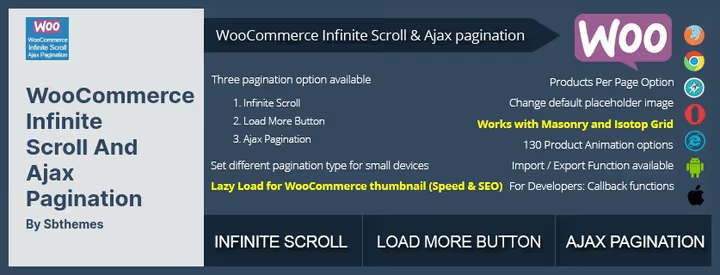
A specialized plugin for WooCommerce stores. Replaces standard product pagination with infinite scroll, Load More button or Ajax pagination, your choice. Nice technical details: lazy loading of WooCommerce thumbnails (thumbnails don't load until the user scrolls down), support for masonry and isotope grids, callback hooks for custom scenarios.
Sold on CodeCanyon. For stores with non-standard themes, built-in import/export of settings between pages.
Pros:
- Deep integration with WooCommerce: lazy thumbnail loading, three navigation modes
- Works with masonry and isotope grids
- Import/export settings, convenient for site networks
- One-time purchase, not a subscription
Cons:
- Only WooCommerce, useless for blog or custom post types
- Alternatives from this list have free versions with similar functionality
- CodeCanyon, updates depend on author, not on WP.org community
Price: $17 (one-time) on CodeCanyon.
🔗 WooCommerce Infinite Scroll on CodeCanyon
6. Infinite Scroll and Ajax Load More

A lightweight free plugin for quickly adding infinite scroll to blog pages. Works on archive, category, author and tag pages. Minimal settings: connected, specified CSS classes for container and items, done.
The plugin doesn't try to replace Ajax Load More in flexibility, it solves exactly one task: removes "Previous/Next" and loads posts on scroll. For blogs with a typical theme, an excellent option for $0.
Pros:
- Free, no Pro versions or hidden payments
- Simple setup through CSS class customization
- Can add Load More button via shortcode
- Button text and loader image can be changed in admin
Cons:
- Doesn't support WooCommerce and custom post types
- Last update July 2025, development pace is slow
- Output template edited through theme loop file, not through interface
Price: free.
🔗 Infinite Scroll and Ajax Load More on WordPress.org
7. Animated Infinite Scroll
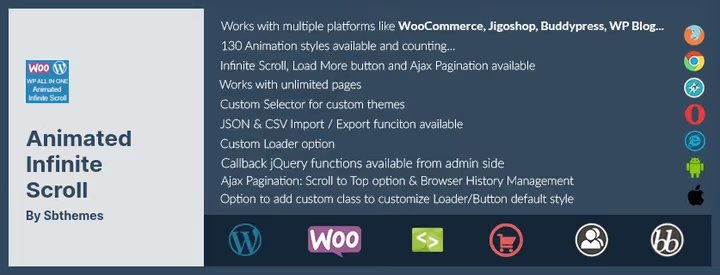
A plugin from Sbthemes with emphasis on animation: 130+ transition styles when loading posts. Works with WordPress, WooCommerce and BuddyPress. Has Ajax pagination with auto-scroll to top, callback hooks for developers, custom CSS selector for custom themes.
Interesting feature: different animations for different pages. For example, smooth appearance in the shop, shift in the blog. Sold on CodeCanyon with 12 months of support.
Pros:
- 130+ loading animations, visual variety
- Compatibility with masonry/isotope and non-standard themes through custom selectors
- Works immediately with WP, WooCommerce and BuddyPress
- CSV and JSON import/export
Cons:
- Paid, only on CodeCanyon, no free version on WordPress.org
- If visual effects are not a priority, $0 alternatives do the same thing
- Support for 12 months, then paid
Price: $15 (one-time) on CodeCanyon.
🔗 Animated Infinite Scroll on CodeCanyon
8. Post Grid with Ajax Filter

This plugin solves a related task: not just infinite scroll, but grid output of posts with Ajax filtering by categories. User selects a category, posts load without reload, and scroll infinitely.
Output is configured through shortcodes: grid with prebuilds, sorting by date, result limit. Suitable for catalogs, portfolios, classified boards. In practice, a good companion for sites where there are many categories and navigation is critical.
Pros:
- Ajax filtering by categories comes included
- Shortcodes for inserting anywhere on the page
- Animated post loading on filtering
- Completely free
Cons:
- Not a replacement for classic infinite scroll for a regular blog, it's more of a filtered catalog
- Fewer installations (3,000+) and fewer reviews than leaders
- Limited grid customization without editing CSS
Price: free.
🔗 Post Grid with Ajax Filter on WordPress.org
9. Load More Products for WooCommerce

BeRocket Load More Products is a WooCommerce specialist with 20,000+ active installations. Three navigation modes: pagination, Load More button, infinite scroll. Can differentiate behavior for desktop and mobile, for example, infinite scroll on phone and button on PC.
Nice features: 40 loading animation styles, automatic URL updates, JavaScript hooks (before and after loading), WPML support. Compatible with Avada, Divi, Storefront and other popular themes.
Pros:
- Separate navigation settings for desktop and mobile
- 40 loader animation styles and button text customization
- JS hooks for inserting your own code
- Free version on WordPress.org covers basic needs
Cons:
- Only WooCommerce, not suitable for blog
- Pro version from BeRocket adds features, but pricing is not transparent
- Less documentation than Ajax Load More
Price: free Lite version, Pro from $20/year on BeRocket.
🔗 Load More Products for WooCommerce on WordPress.org🔗 Pro version on BeRocket
⁉️🤔 Frequently asked questions
Does infinite scroll work with Gutenberg/FSE themes?
Yes, but you need to be careful with selectors. Gutenberg themes generate dynamic CSS classes, standard selectors like
.postor.hentrymay not work.Ajax Load Moresolves this through Query Loop integration: hooks directly into the native editor block, bypassing theme selectors.
How does infinite scroll affect SEO?
There's no direct threat if the plugin updates the page URL on scroll. Google indexes content available at unique URLs.
Ajax Load Morewith SEO add-on andYITH Infinite Scrollingcan change the address bar, the search engine sees separate "pages." Without this, content beyond the scroll point may not be indexed.
Does infinite scroll slow down the site?
Depends on implementation. A good plugin uses Ajax requests (not prefetch everything at once), lazy loading of media and server response caching.
Ajax Load Morewith Cache add-on andLoad More Products for WooCommercehandle it. But heavyJetpackwith a dozen active modules can add 200-400 ms to TTFB.
Which plugin to choose for a WooCommerce online store?
Three candidates:
Load More Products for WooCommerce(separate desktop/mobile settings),YITH Infinite Scrolling(three modes + WPML),WooCommerce Infinite Scroll and Ajax Pagination(masonry grids, one-time purchase). Choose by additional features, all three handle basic infinite scroll.
Can infinite scroll be enabled without a plugin?
Yes, through
WP_Query+admin-ajax.php+ JavaScript. You write an Ajax request handler infunctions.php, a frontend script for tracking scroll and inserting content. For an experienced developer, an hour of work. A plugin handles templates, caching, prefetching, theme compatibility.
Why are there 9 plugins in the list and not 11 as in the title?
The original article included 11 positions.
WordPress Ajax Load More and Infinite Scroll(cpt-ajax-load-more) was closed on WordPress.org in June 2025 due to security issues.Smart Scroll Postswas removed in March 2023 for violating directory rules. Both excluded from the list. We didn't find a replacement with similar functionality among live plugins, the current nine cover all scenarios.
What to install in 2026
If budget is not limited and you need full control, Ajax Load More. Years of development, dozens of add-ons, work with Query Loop, a tool for growth for any project.
WooCommerce store, Load More Products for WooCommerce. Separate behavior on mobile and desktop plus 20,000+ installations speak for themselves.
Need simple infinite scroll without complications, Catch Infinite Scroll. Installed, specified selectors, forgot about it.
And when Jetpack already lives on the site, just enable infinite scroll in its settings and don't multiply extra plugins. Works stably, though without visual refinements.
Try one of the options above. Infinite scroll is not a whim, but a retention tool: according to Ajax Load More developers' data, after implementation, average time on site grows by 25-40%. Your readers will thank you.

A professional team of writers and editors specializing in creating quality content.