














🚀 9 best WordPress plugins for fitness and gym in 2026
A fitness club website that just "sits on the internet" loses clients every day. A visitor arrives, can't find sign-up for a trial session, and leaves for a competitor whose online booking works in two clicks.
WordPress by itself can't manage schedules, calculate BMI, maintain member databases, or collect recurring payments for memberships. But nine plugins from this review cover each of these tasks, from a simple calorie calculator to a full-fledged member portal with billing.
We selected tools that actually work on fitness sites: installed them on a test site, checked compatibility, and filtered out dead solutions. No junk, only what brings sign-ups and revenue.
💡 Quick overview:
- WP Calorie Calculator and Keto Calculator, two lead generation tools: visitor calculates calories or keto macros, you get a contact
- Gym Builder, ready-made fitness site builder with schedule, trainers, and online booking
- AllCoach, platform for personal trainers: programs, activities, Google Meet sessions
- Gym Studio Membership Management, lightweight studio management with QR access for clients
- WP Delicious, SEO recipes with schema markup for fitness blogs
- Timetable Booking Schedule, professional schedule with booking and PDF export
- WooCommerce stack (Groups + Subscriptions + Bookings), member portals with recurring payments
Product | For whom | Price | Key feature |
|---|---|---|---|
WP Calorie Calculator | Marketing and leads | Free / Pro paid | Calculator + email capture |
Gym Builder | Clubs and studios | Free / addons paid | All-in-one builder |
AllCoach | Personal trainers | Free | Coaching programs + Meet |
WP Delicious | Fitness bloggers | Free / Pro paid | Recipe schema markup |
1. WP Calorie Calculator

When a visitor isn't ready to buy a membership yet, give them something useful right now. WP Calorie Calculator adds an interactive tool to your site that calculates daily calorie needs, BMI, and BMR using the Mifflin-St. Jeor formula. The visitor enters age, height, weight, and goal, gets results in seconds.
Unlike narrow BMI calculators, this plugin covers three metrics at once: calories, body mass index, and basal metabolic rate. The free version delivers results instantly on screen, the Pro version collects email before showing results, and that's a ready lead in your funnel. Integrations with Mailchimp, HubSpot, ConvertKit, and Zapier come out of the box.
Colors and fonts adjust to your club's brand without CSS, and the shortcode inserts on any page or sidebar. The plugin is actively updated, latest review June 2026, and supports metric and imperial units.
- Pros: three calculators in one (calories, BMI, BMR), email capture in Pro, GDPR-ready, CRM integrations
- Cons: Pro version paid, functionality excessive for simple "calculate BMI"
- Price: Free, Pro, paid tiers on website
🔗 WP Calorie Calculator on WordPress.org
2. Gym Builder

Complete toolkit for fitness sites of any specialization: gym, CrossFit box, yoga studio, personal training. Gym Builder covers four key blocks that bring clients to fitness sites: class schedule, trainer profiles, member registration, and online booking.
The plugin works through shortcodes, assemble the needed set, insert on a page, and the site is ready to accept clients. Ready templates come out of the box, picking up styles from any theme. Extra plus, built-in fitness calculators (BMI, BMR, macronutrients) that work as lead generation tools: user calculates, you get a contact.
In practice, the free core is enough for a small club: schedule, trainers, and booking cover basic needs. Paid addons, payments and notifications, connect as you grow.
- Pros: one plugin instead of a bundle of 3-4 tools, actively updated, free core covers basic needs
- Cons: extended features in paid addons, admin interface overloaded on first acquaintance
- Price: Free, Pro addons on website
🔗 Gym Builder on WordPress.org
3. WP Delicious

A fitness blog without recipes is a missed audience. Nutrition content consistently ranks in top fitness search queries, but WordPress's standard editor provides neither schema markup nor structured recipe cards. WP Delicious solves this task turnkey.
Each recipe automatically gets Schema markup (JSON-LD), search engines show a rich snippet with photo, cooking time, and calories directly in search results. The plugin builds a recipe card: ingredients as checklist, step-by-step instructions, nutritional value, cooking time. Everything is responsive and works with any theme.
- Pros: free core with full Schema markup, built-in Meal Planner for weekly meal plans, ingredients can link to affiliate links
- Cons: premium display templates in paid version, video recipes require third-party player
- Price: Free, Pro on website
🔗 WP Delicious on WordPress.org
4. Keto Calculator

The keto diet remains one of the most requested directions in the fitness niche. Keto Calculator adds an interactive tool to your site that calculates individual needs for calories, protein, fat, and carbs for user goals: weight loss, maintenance, or muscle gain.
Results display as tables and charts, which is visual and keeps users on the site. Additional asset: the plugin generates personalized meal plans in PDF that visitors can save or print. Works through shortcode, insert once and forget.
- Pros: supports metric and imperial units, PDF export for offline use, free and updated
- Cons: narrow specialization, keto only, other diets not supported, visually looks simple
- Price: Free
🔗 Keto Calculator on WordPress.org
5. AllCoach

Personal trainers, nutritionists, and life coaches need not just a calendar, but an environment for working with clients. AllCoach, a fresh plugin from ThemeGrill (June 2026), covers the full cycle: paid coaching programs, interactive assignments, session booking with Google Meet, and client portal.
The trainer creates a program, breaks it into sections with activities (short answer, multiple choice, checklist), client completes them from personal account. Sessions book considering client's time zone and trainer's availability, double booking blocks automatically. Google Meet link generates itself, no manual copying needed.
The free version works with manual payment confirmation (trainer confirms order in admin), which is sufficient for small practices. Programs can be paid or free, with seat limits or without.
- Pros: full cycle "sale → program → activities → sessions" in one plugin, Google Meet out of the box, client portal without WP admin access
- Cons: plugin is new (v1.0.3, 30+ installs), payment gateways still in plans, requires PHP 8.2+
- Price: Free
6. Gym Studio Membership Management

Not every club needs enterprise-level CRM. For yoga studios, martial arts gyms, and small fitness centers, launch simplicity matters more, and Gym Studio Membership Management handles this better.
The plugin adds several clear sections to admin where you manage classes, instructors, and group rosters. Each member gets an automatically generated QR code on smartphone, uses it to access personal account and check in to classes. Class calendar and membership verification page come out of the box, inserted with shortcodes.
- Pros: free, regularly updated, QR access without developing mobile app, suitable for studios with 15-100 members
- Cons: no built-in payment module, doesn't support multi-location
- Price: Free
🔗 Gym Studio Membership on WordPress.org
7. Timetable Booking Schedule
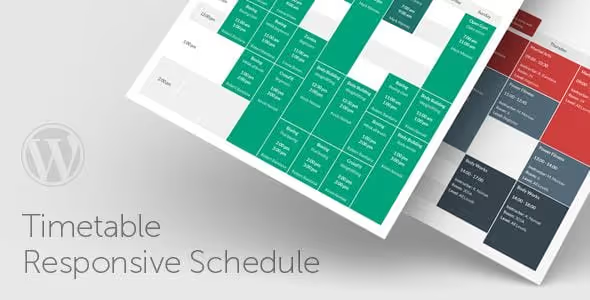
CodeCanyon bestseller in the "WordPress schedule" category. Timetable Booking Schedule creates a responsive schedule grid that's equally convenient to read on desktop, tablet, and phone. Client sees available slots, clicks on a cell, and books a spot.
The plugin integrates with WPBakery Page Builder and inserts via shortcode on any page. Configuration of colors, fonts, and time format through visual interface, no code. Beyond fitness schedules, the plugin is used for sports therapy (treatment schedules), meal plans, and even WODs in CrossFit boxes.
- Pros: schedule export to PDF, appearance customization without CSS, online booking support in premium license
- Cons: paid license (one-time payment), schedule export/import between sites only manually
- Price: one-time purchase on CodeCanyon
🔗 Timetable Booking Schedule on CodeCanyon
8. WooCommerce Groups, Subscriptions and Bookings

The most flexible stack for fitness site monetization, a bundle of three WooCommerce extensions. Groups (free) segments clients by membership types, Subscriptions (paid) bills recurring payments for memberships, and Bookings (see position 9) provides booking for specific classes.
This approach is described in the official guide WooCommerce "Bookings Use Case: Gym Membership" and allows building a full-fledged member portal without third-party LMS and CRM. Client buys membership, gets access to restricted pages (schedule, meal plans, workout videos), and the system automatically charges payment monthly.
- Pros: native integration with WooCommerce Payments and 100+ payment gateways, free Groups + paid Subscriptions/Bookings, pay only for what you use
- Cons: annual subscription for full stack (Subscriptions + Bookings), initial setup requires technical preparation
- Price: Groups, Free, Subscriptions and Bookings, annual subscription
🔗 WooCommerce Groups (free) | 🔗 WooCommerce Subscriptions | 🔗 Official WooCommerce Gym guide
9. WooCommerce Bookings
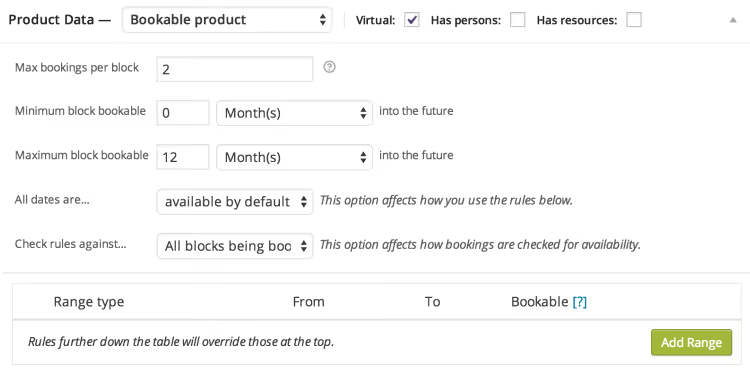
The final element of the WooCommerce stack. Bookings turns classes, individual training sessions, and group programs into "bookable products" in your store. Client selects a slot in the calendar on the product page and books. Payment can be zero (free booking), convenient for trial classes.
The extension works on top of WooCommerce and inherits all its infrastructure: order management, email notifications, reports. Unlike niche fitness plugins, Bookings scales: today booking yoga, tomorrow renting hall for events.
- Pros: zero cost booking for trial classes, booking management through standard WooCommerce interface, unlimited number of bookable products
- Cons: annual subscription, more expensive than niche solutions for sites without online store
- Price: annual subscription WooCommerce.com
⁉️🤔 Frequently asked questions
Do I need separate hosting for a fitness site with these plugins?
Most plugins from the list (Gym Builder, WP Delicious, Keto Calculator) work on regular shared hosting with 256M RAM. WooCommerce Bookings with hundreds of members and AllCoach with Google Meet integration require VPS, allocate 2 GB RAM. If unsure, start with Gym Builder on shared tier: migrating to VPS is possible later through backup.
How does Gym Builder differ from WooCommerce + Bookings bundle?
Gym Builder is a ready "boxed" plugin: schedule, trainers, calculators, booking come in one interface. The WooCommerce stack is a constructor: you assemble Groups + Subscriptions + Bookings yourself and get full customization. Choose Gym Builder if you need quick launch without a developer, choose WooCommerce stack if your site already sells products or services and needs unified payment system.
Which plugin to choose for a yoga studio with 30 clients?
Gym Studio Membership Management (position 6). Free, not overloaded with features, provides QR access for clients and schedule management through shortcodes. If the studio grows and recurring payments become necessary, add WooCommerce Subscriptions.
How does AllCoach differ from Gym Builder for a personal trainer?
Gym Builder builds a club site: schedule, trainers, booking. AllCoach builds a trainer's practice: paid programs, interactive assignments, Google Meet sessions, client portal with progress. For a trainer with individual clients AllCoach is more useful, for a club with group classes, Gym Builder.
Can I use multiple plugins from the list simultaneously?
Yes, and it's normal practice. For example: Gym Builder for schedule and trainer profiles + Keto Calculator for blog + WP Delicious for recipes + WooCommerce Subscriptions for memberships. Main rule, don't duplicate functions: if Gym Builder already builds a schedule, don't install a second calendar plugin (shortcode conflict almost guaranteed).
Will member data persist when changing WordPress theme?
Yes, plugin data (members, payments, schedule) stores in WordPress database and doesn't depend on theme. However, always make a full backup (files + DB) before changing theme: some fitness themes use their own custom post types that may conflict with plugins like Gym Builder.
What to install on a fitness site in 2026: final matrix
Nine tools cover practically any fitness site scenario on WordPress. Here's a quick selection matrix by task:
Task | Choose |
|---|---|
Lead generation and engagement | WP Calorie Calculator + Keto Calculator |
Recipes and content marketing | WP Delicious |
Ready-made site "turnkey" for club or studio | Gym Builder |
Personal coaching and training programs | AllCoach |
Quick studio launch with QR access | Gym Studio Membership Management |
Schedule with booking and PDF export | Timetable Booking Schedule |
Member portal with memberships and recurring payments | WooCommerce Groups + Subscriptions + Bookings |
If you're just launching a fitness site, start with Gym Builder + WP Delicious + Keto Calculator bundle, three free plugins that configure in an evening and cover basic needs expected by clients from a modern fitness portal. As your audience grows, add AllCoach for personal training and WooCommerce stack for monetization.
If this material was helpful, check our selection of WordPress themes for fitness and gym, with the right theme these plugins work even better.

A professional team of writers and editors specializing in creating quality content.