













 AIIllustrative image: AI-generated
🚀 How to host a website for free in 2026: Google Drive discontinued hosting, but here are 5 alternatives
You google "how to host a website on Google Drive for free" and land on tutorials that are already ten years old. The authors cheerfully describe ZIP archives, Google Script, and a magic link googledrive.com/host/. One problem: this method hasn't worked since August 2016. Google officially shut down web hosting on Drive eight years ago.
But the need for free hosting hasn't gone anywhere. A portfolio landing page, an event page, documentation for a pet project: not every site requires a $5/month VPS. And the good news: over the years, platforms have emerged that make free hosting simpler, faster, and more reliable than Google Drive ever could.
Below is an honest breakdown: how the old method worked (if you inherited a site that's still sitting there), why it died, and which 5 actually working free alternatives exist in 2026.
💡 Quick overview:
- Download your site files from Google Drive if they're still there; hosting has been disabled since August 2016
- Choose one of five free platforms: GitHub Pages, Netlify, Cloudflare Pages, Vercel, or Firebase Hosting
- Upload files via Git or a web interface; the site gets HTTPS and a custom domain automatically
- Set up a custom domain through a CNAME record at your DNS registrar
- For dynamic behavior, use serverless functions (they're included in free tiers)
How it used to work: hosting through Google Script
From 2012 to 2016, Google Drive allowed serving HTML files as web pages. All you had to do was make a folder public, get a link like https://googledrive.com/host/<ID>, and any browser would display the index.html from that folder.
Enthusiasts like Amit Agarwal from Digital Inspiration even wrote a Google Script that automated the process: you upload a ZIP archive with site files, and the script extracts it and returns a ready link. It looked like this:

After clicking the upload button, the script returned a URL, and the site worked:
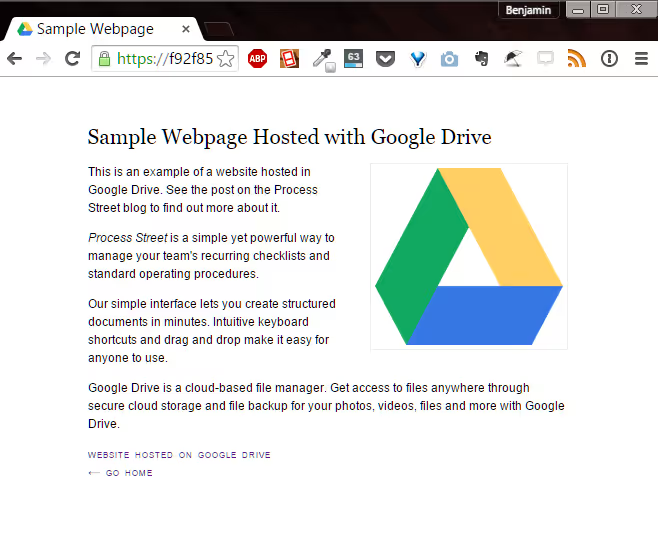
The whole process took a couple of minutes. No servers, no console, just a browser and a ZIP file.
The manual method: folder, sharing, and URL magic
A more advanced approach was manual public access configuration. You created a folder on Drive, uploaded the site files, and opened the sharing settings:
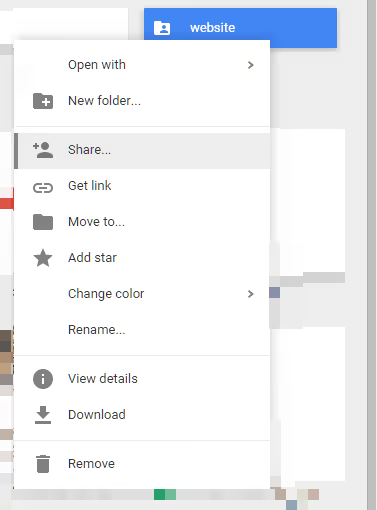
You selected the access level "Public on the web":
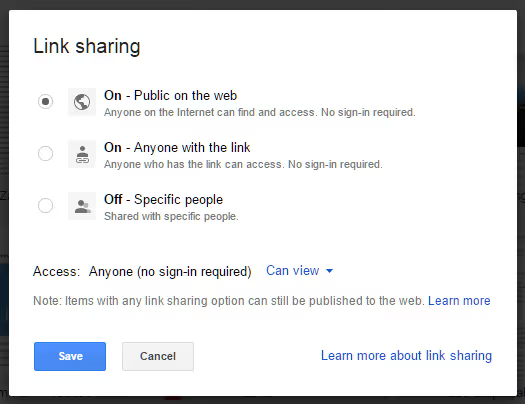
Google returned a link, but it was a link to the folder, not to a web page:
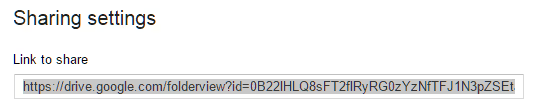
The final step: extract the folder ID from the link and insert it into the template https://googledrive.com/host/<ID>. After navigating to this address, the browser displayed index.html, and the site worked.

Why Google Drive shut down hosting
The official reason from Google (August 2015, support ended in August 2016): over the years, "many public web hosting services have emerged that offer better capabilities." And that's true. Google Drive was never designed for hosting; it had no SSL, caching, custom domains, or any infrastructure for content delivery.
To be fair, 2012-2016 was an era when static hosting was just emerging. GitHub Pages launched in 2008 but was a niche tool for developers. Netlify appeared only in 2014. And Cloudflare Pages didn't arrive until 2020. Today, the choice of platforms for free static site hosting is greater than ever.
5 free alternatives to Google Drive in 2026
Each platform below hosts static sites (HTML, CSS, JS) for free, provides an SSL certificate, supports custom domains, and offers automatic deployment from Git. No ZIP archives and no manual folder sharing.
1. GitHub Pages

The simplest option for those who already have a GitHub account. You create a repository called username.github.io, push HTML files, and the site lives at that address. Free, with no traffic limits and automatic HTTPS.
GitHub Pages runs on Jekyll (a static site generator), but you can also upload plain HTML. A custom domain is configured through a CNAME file in the repository root. Limitation: the site's source code is public (the repository is open). Private repositories are only available on paid GitHub plans.
2. Netlify

The platform that turned static hosting into a full pipeline. You connect a Git repository (GitHub, GitLab, Bitbucket), and Netlify automatically builds and deploys the site on every push. The free tier includes: 100 GB of bandwidth per month, 300 build minutes, unlimited sites, Deploy Previews for pull requests, and serverless functions.
Netlify's standout feature is the visual editor (Netlify Visual Editor), which lets non-technical users edit content directly on the site without diving into code. For teams where content is handled by non-developers, this is a deciding factor.
3. Cloudflare Pages

Cloudflare Pages' free tier is one of the most generous on the market: unlimited bandwidth, unlimited sites, 500 builds per month. Deployment is from a Git repository with preview branches and automatic HTTPS. Cloudflare Pages runs on top of Cloudflare's global network (330+ cities), so site loading is noticeably faster than competitors without a CDN.
The platform also includes Cloudflare Workers (serverless edge functions) and integration with Cloudflare R2 for file storage. If you need production hosting with maximum performance on a free tier, this is the best choice.
4. Vercel

The platform created by the Next.js team, optimized for frontend frameworks: Next.js, SvelteKit, Nuxt, Astro, Remix, and dozens of others. The free tier (Hobby) includes: unlimited sites, 100 GB bandwidth, 6,000 build minutes per month, automatic deployment from Git, and HTTPS out of the box.
Vercel is great if you're developing on a modern JS framework. The platform automatically detects the framework and applies optimal build settings. Serverless functions, Web Vitals analytics, and preview deployments are included in the free tier.
5. Firebase Hosting

Hosting from Google. Ironic but true: the same company that shut down Drive hosting offers one of the best free hosting options for static sites. Firebase Hosting provides 10 GB storage, 360 MB bandwidth per day, SSL, and a custom domain. Deployment is via CLI with a single command: firebase deploy.
Firebase Hosting is tightly integrated with the rest of the Firebase ecosystem (Authentication, Firestore, Cloud Functions). If you're already using Firebase for your mobile app backend, hosting the frontend on the same platform is a logical choice.
Comparison table
Platform | Free bandwidth | Builds/month | Custom domain | SSL | Serverless functions | Highlight |
|---|---|---|---|---|---|---|
GitHub Pages | Unlimited | Unlimited | Yes | Yes | No | Dead simple for GitHub users |
Netlify | 100 GB | 300 min | Yes | Yes | Yes | Visual editor for non-technical users |
Cloudflare Pages | Unlimited | 500 | Yes | Yes | Yes (Workers) | Global CDN across 330+ cities |
Vercel | 100 GB | 6000 min | Yes | Yes | Yes | Best JS framework support |
Firebase Hosting | 360 MB/day | Unlimited | Yes | Yes | Yes (Cloud Functions) | Google Firebase ecosystem |
Step-by-step guide: deploying to GitHub Pages
GitHub Pages is the simplest way to get started with free hosting. You don't need a console (though it's faster with one): the entire process can be done through GitHub's web interface. Here's the step-by-step algorithm.
Step 1. Create a repository
Sign up on GitHub (free). Click the green "New" button on the repositories page. Name the repository strictly following this pattern: yourusername.github.io, where yourusername is your GitHub username. The repository must be public (Public). Click "Create repository."
Step 2. Upload site files
In the freshly created repository, click "uploading an existing file" or the "create a new file" link. Create a file called index.html; GitHub Pages will serve it as the root page. Minimal content:
1 <!DOCTYPE html> 2 <html lang="ru"> 3 <head> 4 <meta charset="UTF-8"> 5 <title>Мой сайт на GitHub Pages</title> 6 </head> 7 <body> 8 <h1>Привет, интернет!</h1> 9 <p>Бесплатный хостинг работает.</p> 10 </body> 11 </html>
Click "Commit new file." GitHub Pages will automatically start the build; typically, the site is available within 20-60 seconds.
Step 3. Open the site
Navigate in your browser to https://yourusername.github.io. You'll see your HTML. That's it, the site is on the internet with HTTPS and without spending a single penny.
Step 4. Connect your own domain (optional)
In the repository, go to Settings → Pages. In the "Custom domain" field, enter your domain (for example, mysite.com). GitHub will verify DNS and automatically issue an SSL certificate through Let's Encrypt. On your DNS registrar's side, add a CNAME record pointing to yourusername.github.io.
Below is a video from Net Ninja that shows the entire process from signing up on GitHub to a working site:
⁉️🤔 Frequently asked questions
Can I restore a site that's still sitting on Google Drive?
Yes, if you still have access to the files. Go to Google Drive, find the folder with the site, download its contents (HTML, CSS, JS files, images). Then upload them to a GitHub Pages repository or drag them into Netlify's deploy folder, and the site will work. The
googledrive.com/host/link itself no longer serves HTML and cannot be restored.
Which of the five options is simplest for a beginner?
GitHub Pages, if you already have a GitHub account. The process takes three steps: create a repository, upload
index.html, open the link. Netlify, if you want to drag and drop files with your mouse (Drag & Drop deployment in the web interface) and avoid dealing with Git. Both platforms don't require a console.
Is free hosting suitable for a business site?
For a landing page, portfolio, or service page, yes. The free tiers of the listed platforms handle production loads without issues. But keep in mind: on the free tier, you don't get an SLA (availability guarantee), and source code on GitHub Pages is public. For a business site with private code or high uptime requirements, upgrade to the paid tier of your chosen platform; all of them offer team features and SLAs on paid levels.
Can I host a dynamic site for free?
Static HTML/CSS/JS, yes, on all the listed platforms. Server-side code (PHP, Python, Ruby), no; these platforms only serve static files. However, serverless functions (Netlify Functions, Vercel Functions, Cloudflare Workers) let you add dynamic behavior (form handling, API endpoints, authentication) without a full server and within the free limit.
Why not just use Google Sites?
Google Sites does indeed let you create and publish a site for free. But it's a page builder with ready-made templates; you don't control the HTML/CSS/JS, you can't easily connect your own domain, and you don't get the performance of specialized static hosting. Google Sites is fine if you need a site "just to have one." For a meaningful project, it's better to choose a platform from the list above.
Free hosting in 2026: what to choose for your task
Ten years ago, Google Drive was practically the only way to publish HTML files without a server and without money. Today, free hosting means SSL, a custom domain, global CDN, and automatic deployment from Git. Progress is evident.
If you've never tried static hosting, start with GitHub Pages. The link yourusername.github.io will work as long as GitHub exists. If you need a visual editor for your team, Netlify. Maximum loading speed, Cloudflare Pages. Modern JS framework, Vercel. Google ecosystem, Firebase Hosting.
Take 15 minutes, and your site will be on the internet. Free and forever.

A professional team of writers and editors specializing in creating quality content.