














🎭 How to manage events with WP Event Manager: a complete 2026 guide
Managing events in WordPress is an endless struggle with dates, registrations, tickets, email campaigns, and a pile of plugins that don't play well together. If the event is online, you also have to deal with Zoom, integrations, and yet another heap of problems.
The worst part is that each task requires a separate tool: one for the calendar, another for ticket sales, a third for registrations. Your admin panel turns into a zoo of ten plugins, each updating on its own schedule and threatening to break its neighbor.
WP Event Manager solves this problem with a single system. It's a free core plugin plus dozens of premium add-ons that you connect as needed. You get a full-featured event management platform without the zoo, without workarounds, and without writing code.
💡 Quick overview:
- Install the free WP Event Manager core from the WordPress.org catalog to get an event calendar, filters, and an admin panel for organizers
- Connect the premium add-ons you need: WooCommerce, Zoom, calendar, registrations (37+ modules total for various tasks)
- Customize the appearance: box or list display, form fields, colors, and categories (works with Gutenberg and Elementor)
- Publish your first event: tickets sell, registrations collect, organizers manage from their own dashboard
What is WP Event Manager
WP Event Manager is an event management system for WordPress built on a modular principle. The free core gives you everything you need to publish events on your site, while premium add-ons provide specialized features: from ticket sales to Zoom integration.
The plugin is lightweight and doesn't overload your site. The code is clean and documented, so developers can customize post types, endpoints, and template files. At the same time, there's no learning curve: events are created through a visual interface without writing a single line of code.
It's compatible with WooCommerce, Google Analytics, all WordPress themes, and major page builders, including Gutenberg and Elementor. Built-in support for 40 language translations with RTL.
As of June 2026, the plugin has over 30,000 active installations on WordPress.org. It's maintained and updated in the official catalog: this is a living product with regular releases. However, the official developer website (wp-eventmanager.com) is currently unavailable at the time of writing. The plugin itself continues to work, but for documentation and support, look to the WordPress.org page and the WP Event Manager YouTube channel.
Key features
The free WP Event Manager core covers the basic needs of any event platform. Here's what you get right after installation:
- Responsive design: events display correctly on mobile and desktop devices with full cross-browser compatibility
- Filterable event catalog: search with filtering by categories, types, and dates via AJAX without page reloads
- Two event display modes: box view (cards) and list view; switch on the fly
- Frontend event submission: organizers add events through a form on the site without accessing the WordPress admin; moderation is built in
- Event preview: all event fields can be reviewed before publishing
- Custom fields: the field editor lets you add, edit, and remove fields in the submission form
- Event categories and types: flexible taxonomy for classification (conference, webinar, workshop, concert, etc.)
- Shortcodes and widgets: insert the event list anywhere; separate shortcode for the calendar
- Event RSS feed: automatic feed for subscribers
- Caching support: fast loading of event pages
- Multi Organizer & Venue: multiple organizers and venues for a single event
- SEO optimized: clean URLs, microdata markup, compatible with Yoast and Rank Math
After installation, the plugin adds a separate "Event Manager" section to the admin with a dashboard showing all events, their status, and registration counts.
Installing WP Event Manager
WP Event Manager installs the standard way, directly from the WordPress admin. No external archives, FTP, or manual edits required.
Go to Plugins → Add New:

Enter "WP Event Manager" in the search field, find the plugin, and click Install Now:

After installation, the button changes to Activate. Click it:

Done, the plugin is active. An Event Manager item appears in the admin sidebar with a set of subsections.
Initial setup

After activation, visit Event Manager → Settings. There are four tabs:

- General: choose list view (box/list), enable event categories and types, Google Analytics tracking
- Event Listings: number of events per page, enable filters and search, configure sorting
- Event Submission: submission permissions, required fields, moderation; form fields are also configured here
- Pages: assign pages for the event list, organizer dashboard, and submission form

The Event Listings tab sets display parameters for the event catalog on the frontend: how many events per page, whether to include filters, how to sort.
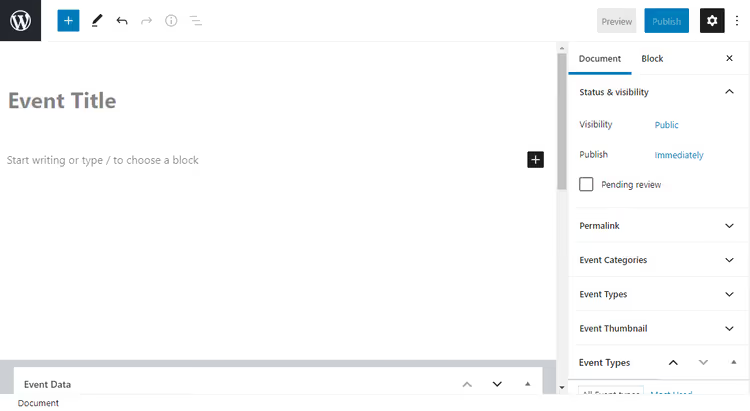
The Event Submission tab controls who can submit events and how: required registration, default user role, moderation.
On the Pages tab, the plugin can automatically create pages for you, or you can assign existing ones. If you skip this step, events won't display on the frontend: this is a common reason for "the plugin is installed but nothing works."
Creating your first event
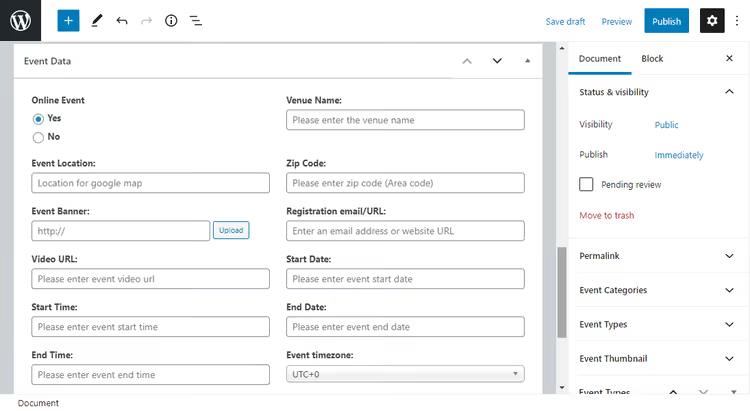
Go to Event Manager → Add New. The event creation form opens:

Form fields:
- Event Title: name of the event
- Event Description: text editor with full description
- Event Date & Time: start and end date/time
- Event Venue: venue and address
- Event Organizer: organizer (you can add multiple)
- Event Category & Type: category and event type

Here you also set the start and end date/time and select a venue from previously created ones.
Everything is intuitive: fill in the fields, click "Publish," and the event appears on the catalog page.
How the event looks on the frontend

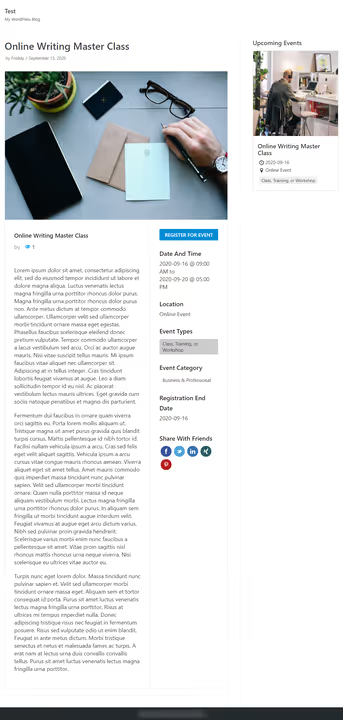
On the frontend, the event gets its own page with full information: title, date, venue, organizer, description. In the sidebar, there's a block with key details (date, time, location). The design inherits styles from the active theme.
Submit event form (frontend)
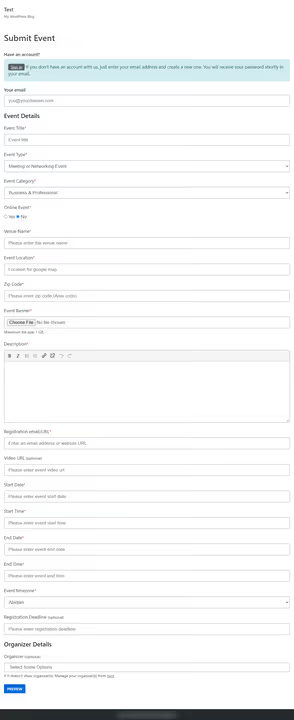
Organizers add events through a frontend form on a dedicated page. The form is configurable: you can set required fields, enable moderation, and allow guest submissions.
Managing events

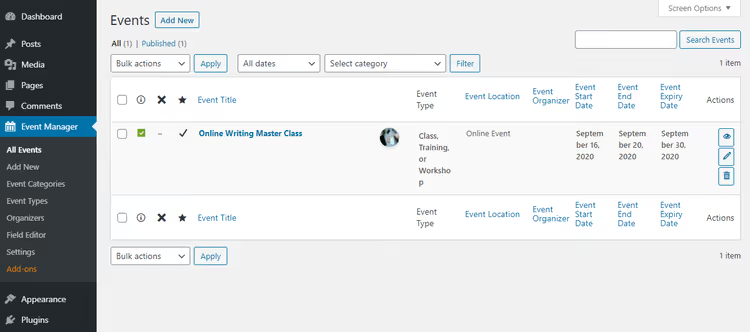
All events are collected in Event Manager → Events as a table with columns: title, date, status, organizer, venue. Bulk editing and filtering work.
Organizer dashboard

Each organizer gets their own dashboard: [event_dashboard]. From here they can see their events, edit them, and manage registrations without accessing the WordPress admin. Access is controlled by roles.
Event calendar

The calendar is a separate shortcode [events_calendar] or widget. Events display on a monthly grid; hovering shows brief information, and clicking leads to the event page.
Shortcodes: the complete set
The plugin provides several shortcodes for different scenarios:

[events]: full event list with filters and search[event_dashboard]: organizer dashboard[submit_event_form]: event submission form[events_calendar]: event calendar[event_summary]: brief summary of a specific event
Each shortcode can be placed on a separate page and assigned in settings (Pages tab).
Page setup
For events to display correctly, you need to create pages with shortcodes and specify them in the plugin settings. Without this step, the events page will be empty: this is the second most common cause of "nothing works" after skipping the Pages tab.
Create a page for event submission: Pages → Add New:

In the page body, insert the shortcode [submit_event_form], set the title, and publish:

On the frontend, the page looks like this (a ready event submission form):
Now return to Event Manager → Settings → Pages and assign the created page:

Select the page from the dropdown:

Save changes:

Settings applied, pages linked to their corresponding shortcodes.

The remaining pages are created and assigned similarly: event list ([events]), dashboard ([event_dashboard]), login page, and organizer page. After configuring all pages, the Pages tab looks like this:
Field editor
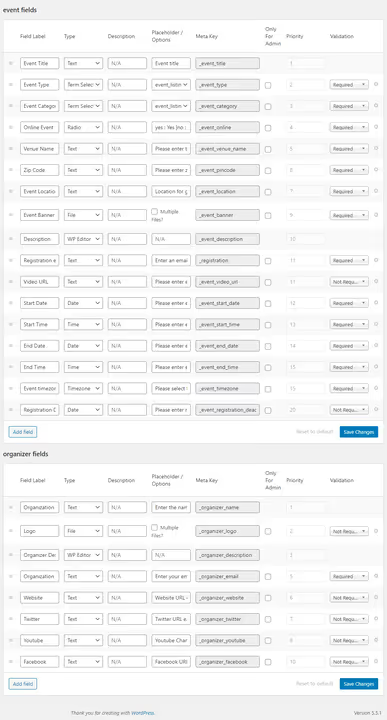
If the standard form fields aren't enough, go to Event Manager → Field Editor. Here you can add new fields, edit existing ones, and change their order by dragging. All changes immediately reflect on the frontend event submission form.
Advanced settings
In Event Manager → Settings, there are several more important options worth checking after installation:

The General tab lets you choose how organizers and venues display, set the option to delete data on uninstall, and enter your Google API key (needed for Google Maps):

The Event Listings tab controls the number of events per page, whether to show/hide cancelled and past events, and filter configuration:

The Event Submission tab covers submission permissions, required registration, default role, and event moderation:

Final settings page after saving:

Premium add-ons: extending functionality
The free core covers basic scenarios, but selling tickets, integrating with Zoom, setting up recurring events, and automating marketing require premium add-ons. There are over 37 of them, each solving one specific task.
Here are the key add-ons with current prices (June 2026; the official vendor site is unavailable, so prices are based on the latest available data from the WordPress.org catalog):
Add-on | Purpose | Personal | Developer |
|---|---|---|---|
Calendar | Interactive event calendar on your site | $39/year | $99/year |
Google Maps | Map with location and nearby event search | $39/year | $99/year |
Registrations | Registration form + list management | $39/year | $99/year |
Sell Tickets (WooCommerce) | Ticket sales via WooCommerce with QR codes | $39/year | $99/year |
Attendee Information | Collecting attendee data during registration | $39/year | $99/year |
Zoom | Zoom integration: webinars, meetings, broadcasts | $39/year | $99/year |
Recurring Events | Recurring events (day/week/month/year) | $39/year | $99/year |
Email Alerts | Event notifications for subscribers | $39/year | $99/year |
Bookmarks | Bookmarks for registered users | $19/year | $49/year |
Embeddable Widgets | Embeddable widgets (Facebook and other platforms) | $19/year | $49/year |
Colors | Color customization for event types/categories | $39/year | $99/year |
Sliders | Event carousel (Owl Carousel) | $19/year | $49/year |
Event Tags | Tags for events | $19/year | $49/year |
Contact Organizer | Contact form for reaching the organizer | $19/year | $49/year |
Export Events | Event export (backup/migration) | $39/year | $99/year |
iCal | Events in Google Calendar and other calendars | $39/year | $99/year |
Google reCAPTCHA | Form spam protection | $39/year | $99/year |
Google Analytics | Tracking event interactions | $19/year | $49/year |
Emails | Email notifications to organizers on status changes | $19/year | $49/year |
Licenses are annual. The Personal Bundle (all add-ons) was priced at $235/year (about 63% savings from retail), and the Developer Bundle at $499/year (for 5 sites). Important: there is no refund policy; confirmation is through the personal account on the vendor site. Since wp-eventmanager.com is currently unavailable, verify the status with the developers via the Support tab on the plugin's WordPress.org page before purchasing.
Organizer App
The mobile app for organizers deserves special mention: it lets you manage registrations, scan ticket QR codes at entry, and track attendance in real time. The app works offline, and data syncs when the connection is restored.
⁉️🤔 Frequently asked questions
Is WP Event Manager free?
Yes, the core is completely free and available in the WordPress.org catalog. You get event creation, calendar, filters, RSS, categories, frontend submission, and the organizer dashboard. Premium add-ons (37+) are purchased separately, each costing from $19 to $99/year.
How does WP Event Manager differ from The Events Calendar?
The Events Calendar (Modern Tribe) is a heavier plugin focused on visuals and theme integration. WP Event Manager is lighter, more modular, and designed for scenarios involving ticket sales, registrations, and organizers. If you need simple event publishing, choose The Events Calendar. If you're building an event marketplace with tickets, choose WP Event Manager.
Can I sell tickets without WooCommerce?
No, the built-in ticket sales work strictly through WooCommerce. However, you can use third-party services (Eventbrite, TicketTailor) via links in the event description, which doesn't require WooCommerce.
Does WP Event Manager support online events?
Yes, through the Zoom add-on. It lets you create Zoom meetings and webinars directly from the WordPress admin, specify the broadcast date/time, and sell access via WooCommerce. The Zoom link is sent to the ticket buyer automatically.
What should I do if the official WP Event Manager website is unavailable?
The plugin itself is alive and updated in the WordPress.org catalog. Documentation is partially available there, and video guides are on the official YouTube channel. Premium users can request support through the Support tab on the plugin's WordPress.org page.
Is WP Event Manager right for your project?
WP Event Manager is a modular event platform builder for WordPress. Its main advantage is that you pay only for what you actually use without bloating your site with dead code.
If you're an organizer who needs a simple calendar and an event page with registration, the free core is enough. If you're building a commercial event platform with ticket sales, Zoom broadcasts, and dashboards for dozens of organizers, connect 5-10 add-ons and cover everything with one system instead of a zoo of plugins.
The plugin is active on WordPress.org with regular updates. The temporary unavailability of the official vendor website is a technical issue that doesn't affect the installed plugin's operation. All downloads and updates go through the WordPress.org catalog.

A professional team of writers and editors specializing in creating quality content.