













 AIIllustrative image: AI-generated
🔥 PHP file managers: 5 live solutions for web development in 2026
PHP file managers solve a problem that isn't always top of mind. The client doesn't know FTP. The content manager needs to upload media files without SSH. Or you need a shared file exchange for a team without Dropbox subscriptions. One PHP page with a browser interface covers all these scenarios in an hour of setup.
Over twenty years the ecosystem has grown: from single-file utilities to enterprise platforms with audit and SSO. We selected five actively maintained projects with different use cases: embedding in CMS, quick administration of hosting, file sharing for teams. One condition: all of them work now, not as of 2018.
💡 Quick overview:
- Embed a file browser in TinyMCE, CKEditor or custom CMS: take elFinder, it has the most ready-made connectors.
- Set up quick web access to server files without dependencies: TinyFileManager, one PHP file.
- Give clients or employees isolated folders with web access and quotas: FileGator.
- Enterprise file sharing with encryption and corporate directory integration: Pydio Cells.
- Cloud interface in Google Drive style directly on your server: FileRun.
Quick reference before the breakdown:
Comparison table: 5 PHP file managers (2026)
Feature | elFinder | TinyFileManager | FileGator | Pydio Cells | FileRun |
|---|---|---|---|---|---|
GitHub stars | 4,800+ | 5,900+ | 3,000+ | none (Go product) | commercial |
Size | ~18 MB | one PHP file | ~15 MB | ~200 MB + Go runtime | PHP application |
Storage backends | Local, FTP, SFTP, S3, Box, Dropbox, Google Drive, OneDrive | Local | Local, FTP, SFTP, S3, Dropbox, Azure | Local, S3, FTP, SharePoint | Local, SFTP, S3 |
Multi-user | Via connector | No | Yes, with roles | Yes, enterprise | Yes, up to 10 free |
Code editor | Ace Editor / CodeMirror | Built-in | CodeMirror | Monaco | No |
License | BSD-3 | GPL-3.0 | MIT | AGPLv3 | Commercial |
Version (2026) | v2.1.69, May 2026 | v2.6, November 2024 | v7.14.3, May 2026 | Cells v5.x | Active development |
1. elFinder: veteran with the widest ecosystem
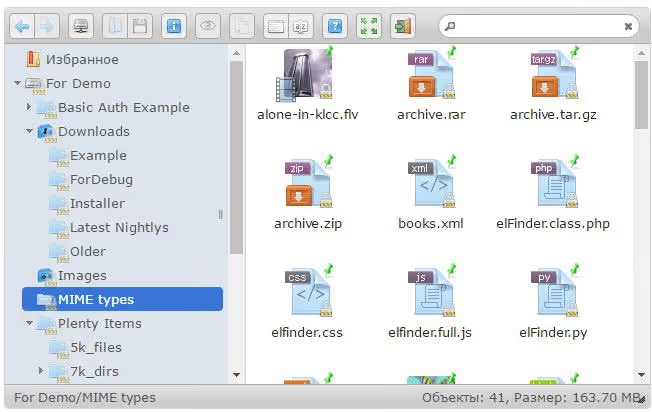
If you've ever embedded a file manager in a CMS or editor, you've almost certainly encountered elFinder (over 4,800 GitHub stars). The project has been around since 2010: version 2.1.69 came out in May 2026 and closed compatibility with jQuery 4.
The key strength of elFinder is its connectors. Local file system, FTP, SFTP, AWS S3, Dropbox, Google Drive, OneDrive, Box: switch by editing config without rewriting the frontend. Under the hood: PHP backend (7.1+ recommended) and jQuery UI frontend. Built-in plugins handle auto-rotation of JPEG, auto-resize on upload and filename sanitization.
Downsides: jQuery UI frontend looks dated by 2026 standards, although Material and Moono themes partially compensate. Custom connectors require digging into documentation, the learning curve is noticeable.
- Pros: maximum coverage of backends out of the box, dozens of ready integrations (WordPress, Drupal, Laravel, Symfony, Roundcube), chunked upload for large files, flexible permission system via connector.
- Cons: jQuery UI interface is morally outdated, steep learning curve for non-standard connectors.
- Price: free, BSD-3 license.
🔗 elFinder on GitHub | 🔗 Live demo
2. TinyFileManager: one PHP file, full functionality

TinyFileManager flips the notion of how much code a file manager needs. It's literally one PHP file: copy to server and get a dual-pane browser with syntax highlighting and editor. The project has gathered over 5,900 GitHub stars.
Despite minimalism, the functionality is serious: dual-pane interface in Total Commander style, folder size calculator, built-in code editor, file and content search, zip/tar/gz extraction, bulk upload via Drag & Drop, password protection via $CONFIG variable.
Perfect scenario: quick hosting administration without FTP. Drop tinyfilemanager.php in root, log in with password, fix config or clean cache. Not suitable for multi-user work, but as a single developer utility on a server it works.
- Pros: extreme simplicity (one file, zero dependencies), dual-pane mode, built-in editor with highlighting, password protection out of the box.
- Cons: no multi-user mode, no cloud backends, only local file system.
- Price: free, GPL-3.0 license.
🔗 TinyFileManager on GitHub | 🔗 Demo
3. FileGator: multi-user combine

FileGator (around 3,000 stars) solves a problem that other managers either ignore or solve through workarounds: real multi-user file management. Version 7.14.3 came out in May 2026, making it the most actively maintained project in the selection.
Architecture: PHP backend on Slim Framework and Vue.js frontend. User registration, roles (administrator, user, guest), disk space quotas, separate home folders, all out of the box. Storage backends: local file system, FTP, SFTP, AWS S3, Dropbox, Azure Blob.
Typical scenario: a web studio deploys FileGator on a subdomain, creates accounts for clients, and each gets isolated storage with web access. Or: a hosting provider gives users a convenient interface to their folders without SSH and FTP client.
- Pros: full system of users, roles and quotas, modern responsive Vue.js interface, six types of backends (including S3 and Azure), free, MIT license.
- Cons: no built-in image editor, fewer ready CMS integrations than elFinder.
- Price: free, MIT license.
🔗 FileGator on GitHub | 🔗 Official site
4. Pydio Cells: enterprise file sharing with open source
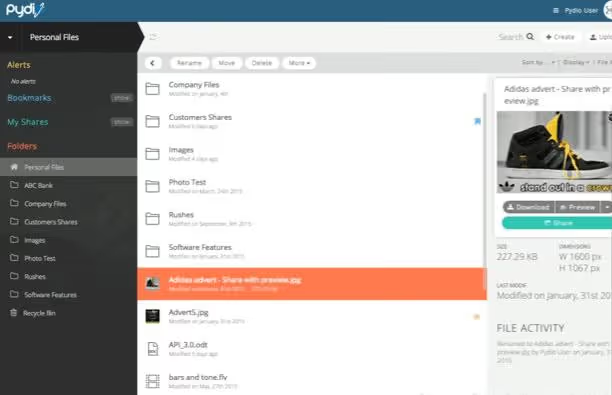
Pydio has come a long way: from PHP file manager to full-fledged enterprise platform, rewritten in Go. Today it's Pydio Cells: self-hosted solution for secure file sharing with data encryption at rest, action audit, versioning and corporate SSO integration (LDAP, SAML, OIDC). Version 5.0 came out in May 2025 as a major architectural revision.
Unlike other participants in the selection, Pydio Cells doesn't embed in CMS as a library: it's a standalone product. Deployed on a separate server, requires Go runtime and database. Enterprise version adds workflow automation via Cells Flows, granular security policies and SIEM integration.
Community version (AGPLv3) is free and covers basic needs: file sharing, synchronization, desktop client, mobile applications. Excessive for small teams and personal use. For medium and large business that needs a SharePoint replacement for file scenarios, quite an adequate choice.
- Pros: enterprise-level security (encryption, audit, SSO), desktop and mobile clients, automation via Cells Flows, on-premise or private cloud.
- Cons: Go runtime instead of PHP complicates installation on standard web hosting, excessive for small teams.
- Price: Community version free (AGPLv3), enterprise plans at pydio.com.
🔗 Pydio Cells | 🔗 Documentation and installation
5. FileRun: cloud UX on your server

FileRun occupies a niche that often remains unattended: PHP file server with interface close to Google Drive or Dropbox. Installed as a regular PHP application, no Go runtime or complex infrastructure.

Among key features: web access to files, sharing (public and private links with password), media file preview directly in browser, full-text content search. Supports local storage, SFTP and S3-compatible storage. Mounts as WebDAV drive in Windows, macOS and Linux, meaning server folders open as a regular network folder. Free for teams up to 10 users.
Typical scenario: small business or developer who needs their own "Dropbox" without subscription fees to cloud services. Data stays on your server, you control access and quotas.
- Pros: familiar cloud UX without cloud services, full-text search, WebDAV mounting as network drive, PHP without complex dependencies.
- Cons: no built-in code editor, commercial license for teams larger than 10 users.
- Price: free up to 10 users, plans for larger teams at filerun.com.
⁉️🤔 Frequently asked questions
Can TinyFileManager be used on a production server?
Yes, but with caveats. One PHP file with password protection is convenient for administration, however the absence of audit, roles and action log means that for multi-user environment it's better to take FileGator. On production TinyFileManager is placed via a separate subdomain with Basic Auth on top of the manager password: double protection reduces risks.
Which file manager is easiest to embed in WordPress?
elFinder has a ready plugin WP File Manager with over 1,000,000 active installations, built on its codebase. This is the most direct way to add a file browser to WordPress admin. FileBird and Real Media Library solve a related task, organize the media library, but they're not full-fledged file managers.
How does FileRun differ from FileGator?
FileGator is oriented toward hosting providers and web studios: separated home folders for each user, roles and quotas. FileRun is closer to personal cloud storage with collaboration: public links, WebDAV drive, full-text content search. If you're giving clients isolated folders, take FileGator. If you want "your own Dropbox" for a small team, take FileRun.
What happened to the old simogeo/Filemanager, RichFilemanager and simple-file-manager?
simogeo/Filemanager is officially marked as deprecated and recommended switching to RichFilemanager. But RichFilemanager (psolom) was last updated in 2018, has unclosed vulnerabilities and is effectively abandoned. jcampbell1/simple-file-manager was removed from GitHub. None of the three should be used in new projects.
Is a file manager needed if there's FTP and SSH?
FTP and SSH are developer tools. A file manager is a tool for content manager, client or administrator who doesn't need direct server access. Plus web managers embed in CMS and editors, which FTP fundamentally can't do.
What to install in 2026: final breakdown
Five tools cover different tasks, and the right choice is determined by scenario, not rating.
- If you're developing CMS or embedding manager in an editor, take elFinder: connectors will cover almost any backend.
- If you need an "all-purpose" utility without dependencies, TinyFileManager will handle it with one file.
- If you're deploying a file exchange for clients or team with separated access, FileGator will give roles and quotas out of the box.
- If the company needs a secure replacement for enterprise file sharing with SSO and audit, Pydio Cells will cover this scenario.
- If you want personal cloud storage on your server without Go runtime and subscription fees to cloud services, take FileRun.
All five projects are in active development as of June 2026. Start with TinyFileManager: it will deploy in five minutes and show whether you even need a heavier tool. Which one is already running on your server? Write in the comments.

A professional team of writers and editors specializing in creating quality content.