














🖼 12 best WordPress gallery themes 2026
A gallery that lags on mobile kills interest faster than mediocre photos. A standard WordPress blog theme cannot handle masonry grids, lazy loading of dozens of images, or a fullscreen lightbox because it was never designed for that.
A gallery theme solves exactly this problem: images load fast, look polished, and visitors browse them like in a real photo gallery rather than a news feed. We selected 12 actively maintained WordPress themes for galleries and portfolios, ranging from lightweight minimalist options to builders with 60+ demos.
We tested each theme on a staging site: installed it, imported the demo, ran it through PageSpeed, and tested both desktop and mobile galleries. Below are the results.
💡 Quick overview:
- You need a powerful visual builder and tons of demos: check out Total, Ultra, or Oshine
- You want a lightweight theme without bloat: go with Remake, Emily Nolan, or Ambiance Pro
- You need a specialized photo platform with proofing and albums: pick Phoxy or Peak
- Horizontal scrolling and unconventional UX: take a look at Anotte
This video provides a step-by-step WordPress gallery setup from theme installation to a finished portfolio. It demonstrates working with grids, lightboxes, and image loading speed optimization. We recommend watching it before making your decision.
Below is a comparison table of all 12 themes, followed by a detailed breakdown of each.
Theme | Builder | Gallery type | WooCommerce | Price | Best scenario |
|---|---|---|---|---|---|
Total | WPBakery | Grid, masonry, slider | Yes | $59 | Universal portfolio |
Ambiance Pro | None (Genesis) | Full-width images | Yes | Included with WP Engine | Blog and portfolio with text focus |
Peak | Themify Builder | Masonry grid | Yes | $59 | Photographers and artists |
Ultra | Themify Builder | Grid, masonry, slider, fullscreen | Yes | $59 | Maximum layout flexibility |
Emily Nolan | None | Standard grid, parallax | No | $59 | Minimalist photo portfolio |
Anotte | None | Horizontal scroll, fullscreen | No | $59 | Unique horizontal presentation |
Helion | Elementor | Grid, Slider Revolution | Yes | $59 | Portfolio on Elementor |
Oshine | WPBakery | Grid, masonry, carousel, fullscreen | Yes | $59 | Proven theme with 52 demos |
Phoxy | WPBakery | Albums, galleries, proofing, fullscreen | Yes | $69 | Professional photo platform |
Hayden | None | Slider, portfolio widgets | No | $79 | Agency and studio with portfolio |
Remake | None (custom blocks) | Grid, masonry, carousel | No | $59 | Modern lightweight portfolio |
BigBang | None | 2-4 column grid, hexagons | No | $39 | Budget unconventional portfolio |
1. Total

🔗 Total on ThemeForest | 🔗 Official website
Total is the flagship theme from WPExplorer that covers virtually any scenario: from a modest blog to an online store. It is built entirely on WPBakery Page Builder, and the visual builder comes included at no extra cost.
For galleries and portfolios, Total is particularly convenient. It includes: unlimited customizable pages, 40+ ready-made WPBakery modules, multiple sidebar options, and header styles. The live customizer lets you edit the site and see results instantly.
The demo collection contains dozens of ready-made sites for different niches, all importable with one click. For a visually focused portfolio, you take the Photography or Portfolio demo, swap in your own content, and get a finished result within an hour. In practice, Total works for both beginners (demo import + visual editor) and experienced users (granular control via WPBakery).
- Pros: 40+ WPBakery modules, dozens of demos for various niches, live customizer, WooCommerce compatibility
- Cons: WPBakery can be heavy on weak hosting, the builder itself has a learning curve
- Price: $59 (one-time, single site license)
- Download: 🔗 Total page | 🔗 Live demo
2. Ambiance Pro
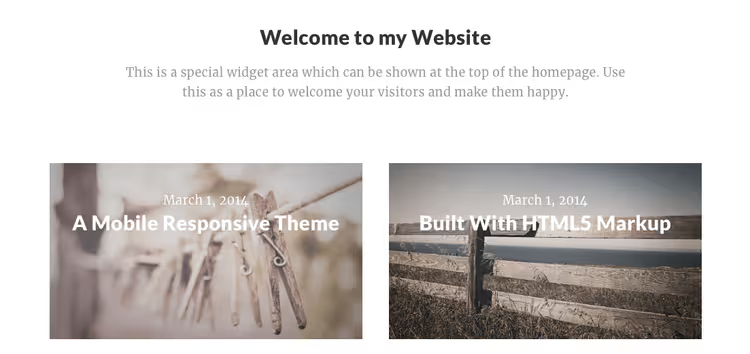
Ambiance Pro is a child theme of the Genesis Framework from StudioPress, now part of the WP Engine ecosystem. This is the choice for those who prioritize speed, clean architecture, and out-of-the-box SEO over a visual builder with tons of settings.
The theme is designed for atmospheric presentation: full-width images, elegant typography, spacious layouts. Nothing distracts from your work: no flashy animations, no cluttered sidebars. Galleries and portfolios look polished precisely because of this minimalism.
Features include: customizable header, custom logo, flexible homepage widgets, responsive layout. WooCommerce support is available, so you can attach a store to your portfolio. The theme comes as part of Genesis Pro or with WP Engine hosting; a standalone license is no longer available. On our test site, Ambiance Pro showed the best PageSpeed results among all themes in this roundup.
- Pros: outstanding speed, clean Genesis code, strong out-of-the-box SEO, elegant minimalism
- Cons: no visual builder, not sold separately (only with WP Engine), fewer demos than competitors
- Price: included with WP Engine (from $20/month) or Genesis Pro
- Download: 🔗 Ambiance Pro page
3. Peak
🔗 Peak on Themify | 🔗 Peak demo
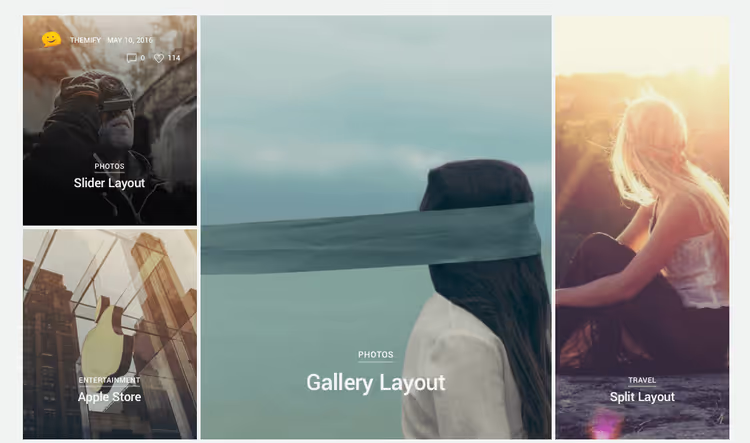
Peak from Themify is a theme built around a masonry grid. Tiles automatically align, adapting to any screen size. This is its main feature: you upload an image of any size, and the grid arranges everything automatically. No need to resize each image to a uniform format.
If you need a strict, uniform look, you can set a fixed tile size. Peak supports mega menus, WooCommerce, slide-out widgets, and multiple post formats. The theme is lightweight and works equally well on desktop and mobile.
Primary scenario: photographers, artists, and designers who want a visually rich site without manual layout work. Peak does not try to be a universal theme for everything; it excels specifically as a gallery and portfolio solution.
- Pros: smart masonry grid, mega menu support, WooCommerce compatibility, lightweight and fast
- Cons: fewer demos than Ultra (from the same lineup), fixed tile formats require manual configuration
- Price: $59 (one-time, single site license)
- Download: 🔗 Peak page | 🔗 Live demo
4. Ultra

🔗 Ultra on Themify | 🔗 Ultra demo
Ultra is the most powerful product in the Themify lineup. If Peak is a tool for a specific task, Ultra is a Swiss army knife. The theme ships with 60+ ready-made demo layouts covering virtually any niche, including several options for portfolios and photo galleries.
The built-in Themify Builder gives you full control over layouts: 17 header styles, background sliders, video backgrounds, parallax scrolling, element appearance animations. The visual arsenal here is richer than most competitors. On good hosting, speed remains solid.
For a gallery site, particularly useful features include: filterable portfolio grid layouts, fullscreen sliders, and out-of-the-box lightbox support. If you are not sure exactly what gallery layout you need, Ultra lets you try a dozen options without switching themes.
- Pros: 60+ demos, 17 header styles, filterable portfolio grids, fullscreen sliders
- Cons: can be heavy on weak hosting, the abundance of options is overwhelming at first
- Price: $59 (one-time, single site license)
- Download: 🔗 Ultra page | 🔗 Live demo
5. Emily Nolan

Emily Nolan is a niche theme for photographers and visual artists from MadSparrow. Its philosophy: the theme should not compete with the content. Minimalist design, fast loading, responsive layout: everything serves to showcase your work without visual noise.
Technically, the theme is simple. There is no built-in page builder, but there are unlimited colors, parallax effects, animated page transitions, and social media integration. Everything is configured from the customizer, and the learning curve is low.
Emily Nolan is not for online stores or corporate sites. This is the choice for a photographer or artist who needs a stylish, fast portfolio where the work speaks for itself. In practice, the theme is ideal for a portfolio of 20-30 works; larger collections require more advanced filtering.
- Pros: extremely lightweight, stylish minimalism, low learning curve, unlimited colors
- Cons: no WooCommerce, no page builder, not for large work catalogs
- Price: $59 (one-time, single site license)
- Download: 🔗 Emily Nolan page
6. Anotte

Anotte is a horizontal scrolling theme that replaced the discontinued TheNa. Instead of the usual downward scroll, content moves sideways: an unusual UX that visitors remember immediately. For a photographer or wedding agency, this is exactly the wow effect that sets the site apart from hundreds of templated portfolios.
The theme supports fullscreen lightbox with EXIF data display, password-protected client galleries, and touch navigation for mobile. Several gallery formats are available: masonry, aligned grids, and before/after comparison. The built-in blog lets you tell stories about your shoots.
Anotte is not a universal theme. It is a deliberate choice for those who want a unique horizontal presentation and are willing to give up traditional vertical structure for it. On our test site, horizontal scrolling worked smoothly on both desktop and mobile, with well-implemented touch navigation.
- Pros: unique horizontal scrolling, EXIF display in lightbox, password-protected client proofing, touch navigation
- Cons: horizontal UX is unfamiliar to some visitors, limited WooCommerce integration, not for content-heavy sites
- Price: $59 (one-time, single site license)
- Download: 🔗 Anotte page
7. Helion

Helion is a theme built around Elementor, the most popular page builder for WordPress. If you have already worked with Elementor, the learning curve is zero. If not, the visual drag-and-drop editor can be mastered in an evening.
Included: one-click demo importer, Slider Revolution and Swiper Slider for advanced sliders, retina images, numerous widgets and shortcodes. Helion is positioned as a personal portfolio solution but also works for wedding sites, online magazines, and online stores.
For galleries, the key advantage is Elementor's flexibility: you compose the gallery page exactly as needed, without being limited to theme presets. Slider Revolution adds impressive fullscreen slideshows for the homepage.
- Pros: full Elementor integration, Slider Revolution included, one-click demo import, WooCommerce
- Cons: performance depends on Elementor layout weight, fewer gallery demos than Total/Ultra
- Price: $59 (one-time, single site license)
- Download: 🔗 Helion page
8. Oshine

🔗 Oshine on ThemeForest | 🔗 Official website
Oshine is one of the most popular creative themes on ThemeForest: 38,000+ sales and consistent updates over many years. It makes this gallery roundup because of its collection of 52 demos, most of which are designed for visual presentation: photographers, agencies, architecture firms, artists.
The theme works with WPBakery Page Builder and offers its own set of modules for portfolios and galleries. Grid, masonry, carousel, fullscreen slider: all major display formats are covered. Plus built-in WooCommerce support for selling your work.
In 2026, Oshine received an update to version 62 with new templates for modern portfolios. If you need a theme with a long support history, a large user base, and proven WordPress core compatibility, this is one of the safest choices.
- Pros: 52 demos, 38,000+ sales, v62 update in 2026, full set of gallery formats
- Cons: WPBakery adds hosting load, some of the 52 demos are stylistically dated
- Price: $59 (one-time, single site license)
- Download: 🔗 Oshine page | 🔗 Live demo
9. Phoxy

Phoxy is a specialized theme for photographers, designed for photography scenarios: albums, galleries, events, proofing (private client galleries), fullscreen slideshows. A page builder is not required; the theme is self-sufficient.
The numbers are impressive: 30 homepage variations, 13 album types, 14 gallery layouts, 5 blog styles. Add customizable typography, unlimited colors, and social media integration, and you get a full-featured photo platform on WordPress.
Phoxy works with WooCommerce (selling photos and prints), Contact Form 7, WPBakery, The Grid, and Appointments Booked. For a photographer who wants more than just a portfolio, a full client area with proofing and session booking, this is a specialized rather than universal solution.
- Pros: 30 homepage variations, 13 album types, client proofing, shoot calendar integration
- Cons: narrow specialization (not for non-photographers), above-average price, proofing system has a learning curve
- Price: $69 (one-time, single site license)
- Download: 🔗 Phoxy page
10. Hayden
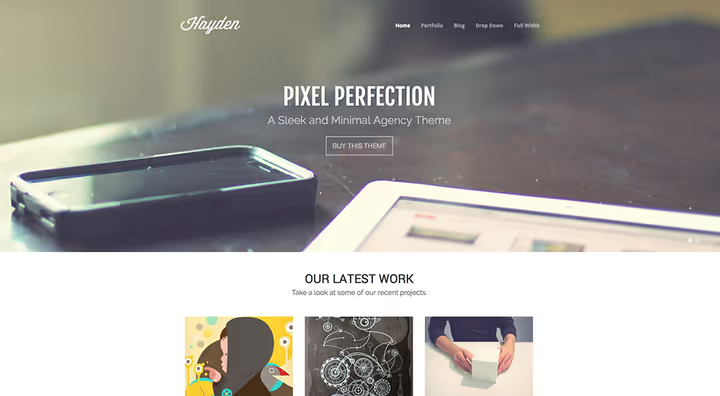
Hayden from ThemeTrust is a theme at the intersection of an agency site and a portfolio. The massive full-width slider on the homepage immediately sets the tone: this is for those who want to showcase work dramatically, not just arrange it in a grid.
Functionally, Hayden offers responsive shortcodes and widgets (slideshows, buttons, custom blocks), a client testimonials section, ready-made page templates, Google Fonts, and Google Maps. The built-in settings panel lets you change colors and fonts without code.
The theme suits design agencies, freelancers, or small studios that need to sell services through their portfolio. The gallery portion is flexible, but Hayden's main strength lies in the presentation layer: slider, testimonials, "services + work" structure.
- Pros: impressive full-width slider, testimonials section, ready-made "services + work" structure, Google Maps
- Cons: above-average price, no built-in page builder, fewer demos than the leaders
- Price: $79 (one-time, single site license)
- Download: 🔗 Hayden page
11. Remake

Remake is a modern minimalist theme from Code-less, built around a smooth user experience. No visual clutter: the focus is strictly on your work, and animations and transitions are designed to highlight content rather than distract from it.
For galleries and portfolios, Remake offers custom sliders, multiple work display formats (grid, masonry, carousel), and ready-made templates for creative and digital agencies. The theme is optimized for speed and performs well in Core Web Vitals.
Compared to veterans like Oshine or Total, Remake is a lighter and more focused solution. Ideal if you need a portfolio of 20-30 works rather than a mega-site with tons of sections. It is actively updated and compatible with the current WordPress version.
- Pros: very lightweight, great Core Web Vitals, custom sliders, modern minimalism
- Cons: no WooCommerce, no page builder, not for large multi-page sites
- Price: $59 (one-time, single site license)
- Download: 🔗 Remake page
12. BigBang
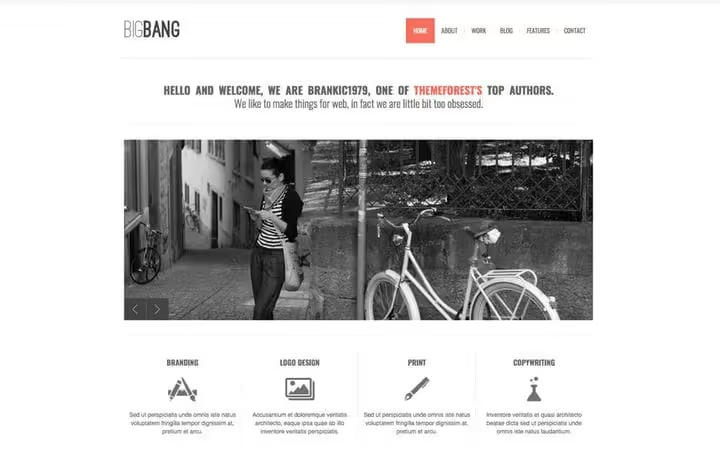
BigBang closes out the roundup as a representative of the old-school portfolio theme approach from Brankic1979, one of ThemeForest's veterans. It includes several page templates, 6 portfolio formats (2-, 3-, and 4-column grids plus hexagonal), jQuery sliders, accordions, and photo streams.
The theme is compatible with modern WordPress requirements, but there have been no major releases in recent years. If you are looking for a solution that gets updates every month, BigBang is not for you.
However, for a freelancer who needs a quick, proven portfolio with unconventional formats and is not chasing trendy builders, BigBang remains a viable option. Just test it on a staging environment before launch and verify compatibility with the current WordPress version.
- Pros: unconventional formats (hexagons), 6 portfolio options, lowest price in the roundup
- Cons: no recent updates, old-school jQuery sliders, no built-in page builder
- Price: $39 (one-time, single site license)
- Download: 🔗 BigBang page
⁉️🤔 Frequently asked questions
What is the difference between a gallery theme and a regular portfolio theme?
A gallery theme is optimized for displaying a large number of images on a single page: masonry grids, lightbox, fullscreen sliders, category filtering. A portfolio theme more often focuses on presenting individual projects with descriptions. In practice, the line is blurred: most themes in this roundup handle both galleries and portfolios equally well. Choose based on specific features rather than the label.
Do I need a separate gallery plugin if I get a gallery theme?
It depends on the theme. Total and Oshine include built-in gallery modules through their builders, so an additional plugin is not required. But if you need advanced functionality (copy protection, client proofing, photo sales), a plugin like Envira Gallery or NextGEN may offer more than the theme's built-in features. We have a separate gallery plugin review; compare both approaches.
What matters more for a gallery site: theme design or loading speed?
Speed. Visitors will not appreciate a beautiful grid if it takes 5 seconds to load. Choose a theme that delivers images in WebP/AVIF, supports lazy loading, and does not load 15 unnecessary scripts on every page. The lightest in this roundup: Ambiance Pro (Genesis Framework), Emily Nolan, Remake. The heaviest: Ultra and Oshine, which is expected given their functionality. This can be offset by caching and server-side image optimization.
Can I use a free theme for a gallery?
You can, but the selection is narrower. Among free themes with good gallery functionality, consider Kadence, GeneratePress (with blocks), and standard WordPress block themes (Twenty Twenty-Five) with a gallery plugin. Downsides of free themes: fewer ready-made portfolio demos, built-in lightbox and masonry are rare, and support is through forums. If the site is commercial or serves as your main portfolio, investing in a premium theme from the list above pays off in time saved.
Which theme should I choose if I know nothing about WordPress?
Go with Total or Ultra. Both have a visual builder, one-click demo importer, and detailed documentation. The workflow is simple: buy, install, import a portfolio demo, replace the content with your own. If your budget is minimal, choose Remake: cheaper, simpler, but without a page builder (it uses the standard WordPress editor with enhanced blocks).
How often should I update a gallery theme?
With every release, like any other WordPress theme. Skipping updates creates a vulnerability risk. Always back up before updating. For ThemeForest themes, watch the changelog: if a theme has not been updated in over a year, that is a warning sign. In this roundup, this applies to BigBang and Emily Nolan: check the last update date before purchasing.
What to install in 2026: final breakdown
Choosing a WordPress gallery theme in 2026 comes down to three scenarios.
You need maximum flexibility and are willing to learn the settings: go with Total (WPBakery + 40 modules) or Ultra (Themify Builder + 60 demos). Both turn your images into a professional portfolio through builders and ready-made layouts. If you are already in the Elementor ecosystem, Helion will feel native from the first minute.
You need narrow specialization for photography: Phoxy with albums, proofing, and a shoot calendar covers scenarios that universal themes cannot. You want a lightweight, modern, fast portfolio without bloat: Remake or Emily Nolan will handle the task without extra code.
You want to stand out with unconventional presentation: Anotte with horizontal scrolling delivers that wow effect that vertical competitors lack.
And most importantly: whichever theme you choose, optimize your images before uploading. Compression to WebP/AVIF, lazy loading, and CDN do more for gallery speed than the theme itself. The most beautiful grid that takes 4 seconds to load loses to a simple but instant one.
Choose based on your task, not someone else's ranking. And send us a link to the result; we are curious to see what you create.

A professional team of writers and editors specializing in creating quality content.