













 AIIllustrative image: AI-generated
💼 5 best job board plugins for WordPress 2026 (free and paid)
A job board website on WordPress is not science fiction or a five-figure project. The five plugins discussed below solve this task without hiring a developer: each adds a job board to your site with filters, application forms and a candidate dashboard in just a couple of hours.
The problem is that there are dozens of job board plugins for WordPress, and half of them are either abandoned or so overloaded with features that the site starts lagging during setup. We checked current versions, live installations and real reviews on WordPress.org and selected five solutions that work reliably, get updated and don't require jumping through hoops.
In this breakdown, an honest top five job board plugins for 2026: from the most lightweight to full-fledged recruiting powerhouses. Look at live screenshots, compare using the table and grab the one that fits your task.
💡 Quick overview:
- Decide on scale: for a simple job list, the free version of any plugin from this selection will suffice, for a full portal with dashboards and payments, look towards WP Job Manager or JS Job Manager.
- Install the plugin through the WordPress admin panel (Plugins → Add New → search by name), activate and create a jobs page using a shortcode, each plugin has its own.
- Configure the appearance: all five plugins inherit theme styles, but if the result doesn't satisfy you, add CSS rules in Customizer, this will take 10-15 minutes.
- Publish your first job and test the chain "application → notification → saving application in admin panel" before opening the board to real candidates.
Below, a comparison of key characteristics to save you half an hour of browser tabs:
Characteristic | Simple Job Board | WP Job Manager | Job Manager & Career | HireZoot (WP Job Openings) | JS Job Manager |
|---|---|---|---|---|---|
Developer | PressTigers | Automattic | ThemeHigh | awsm.in | JoomSky |
Free version | ✅ Yes | ✅ Yes | ✅ Yes | ✅ Yes | ✅ Yes |
Pro price | Add-ons $10-$49 | Extensions separately | $49/year | PRO Pack (separately) | $29 one-time |
AJAX filters | ✅ | ✅ | Basic | ✅ | ✅ |
Candidate dashboard | ❌ | ❌ (in Pro) | ❌ | ❌ (in Pro) | ✅ |
Resume upload | ✅ | ❌ (extension) | ✅ | ✅ | ✅ |
Ready shortcodes | 12+ | 5 | 3 | Auto-generation | 25 (free) / 45 (Pro) |
Active installations | 10,000+ | 100,000+ | 1,000+ | 20,000+ | 800+ |
1. Simple Job Board, free powerhouse with application form builder

Simple Job Board by PressTigers is one of the most flexible free plugins in this selection. Its main feature: you get not only a job list with filters, but also an application form builder right in the WordPress admin panel. No code, just drag and drop fields in the desired order, add specifications for each vacancy and publish.
The plugin is fully ready to work immediately after activation. You create a page, insert the shortcode [jobpost], and a job board with search, filters by categories, employment type and location appears on the site. Supports grid layout via [jobpost layout="grid"] and output of jobs from a specific category via [jobpost category="category-slug"].
Multilingualism deserves special mention: Simple Job Board is translated into 14 languages, including Russian, Arabic, Hebrew and Japanese, a huge plus for international projects. As of June 2026, the plugin has version 2.14.4, a rating of 4.7 on WordPress.org and over 10,000 active installations.
What's good:
- Free core covers 90% of an ordinary employer's needs: publishing, search, receiving applications, resume upload
- Flexible application form builder without programming skills
- Mobile app for job management (Android and iOS)
- Built-in microdata for Google Jobs (via add-on for $20)
What's disappointing:
- Advanced functions (notifications about new applications with attachments, CAPTCHA, CSV export) only through add-ons priced from $10 to $49
- No built-in candidate dashboard, only viewing list of respondents in admin panel
- With a large number of add-ons (there are 30+), the final cost may be comparable to premium plugins
Verdict: best choice for companies that need a job board with a customized application form and multilingual support without monthly payments. Buy add-ons only for actual needs.
🔗 Simple Job Board on WordPress.org
2. WP Job Manager, industry standard from Automattic

WP Job Manager is developed by the Automattic team, the same one behind WordPress.com, WooCommerce and Jetpack. This is the most popular job board plugin in the WordPress ecosystem: over 100,000 active installations, a rating of 4.2 and version 2.4.2 as of June 2026.
The key advantage of WP Job Manager is architecture. The plugin is built on Custom Post Types, which means full compatibility with any SEO plugins (Yoast, Rank Math) and page builders. Jobs are indexed by search engines as regular pages, and the plugin itself doesn't create unnecessary server load: the code is written minimally, without bloated functionality "for future growth."
At the basic level you get: a front-end job submission form (shortcode [submit_job_form]), a job list with AJAX filtering ([jobs]), an employer dashboard ([job_dashboard]) and an RSS feed for candidates. All of this is free and without limitations on the number of jobs.
Advanced scenarios, receiving applications through a form, paid publications through WooCommerce, candidate resumes and email notifications, are handled through official extensions that are paid separately.
What's good:
- Developed by Automattic: code is written to WordPress standards, updates are released regularly
- Not tied to a specific theme, works with any modern template (if necessary, 10-15 minutes of CSS tweaking)
- Open source on GitHub: you can customize fields and logic through filters and hooks
- Built-in statistics for employers: job views and search impressions
What's disappointing:
- Resume upload only through paid Resume Manager extension
- Front-end forms at basic level are minimalist, customization will require a developer or plugin like WP Job Manager Field Editor
- Extension prices: each is paid separately (annual subscription), when connecting 3-4 extensions the budget grows noticeably
Verdict: golden middle for those who need a reliable, lightweight and extensible plugin without vendor lock-in. If you plan to add paid publications or a candidate dashboard over time, WP Job Manager won't make you migrate to another plugin, just connect the needed extension.
🔗 WP Job Manager on WordPress.org
3. Job Manager & Career, neat solution with accordion layout from ThemeHigh
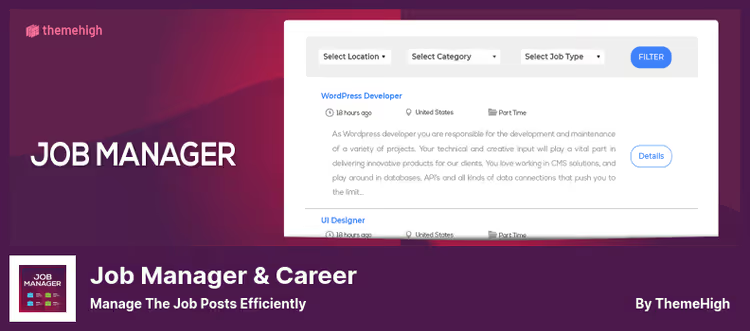
Job Manager & Career by ThemeHigh occupies the niche of a "simple and predictable" plugin that doesn't try to embrace everything. Install, insert the shortcode [THJM_JOBS] on a page, and the job board is ready. For the HR section of a small company or local business, this is more than enough.
Two features that distinguish this plugin from the rest: the ability to attach a "special badge" to a job (urgent, hot position) and accordion layout of the career page in the premium version, the job list turns into an "accordion" where the description expands on click. In practice, this saves space on the page and reduces visual noise.
The application format is flexible: you can enable the built-in Apply Now form (with resume upload in.doc,.pdf,.docx) or disable the form and receive applications to a specified email, useful if you already have an application processing workflow through CRM. The plugin was updated to version 1.5.1 in June 2026, developer ThemeHigh keeps the product up to date.
What's good:
- Minimal entry barrier: shortcode
[THJM_JOBS]on a page, and the board works - "Reset to one click" function: if you over-configured settings, you return everything to default values
- Ability to share jobs on social networks via built-in Social Share button
- Import and export of settings: convenient when transferring between dev and production
What's disappointing:
- Premium version costs $49/year (one license) or $99/year (up to 5 sites) for functionality that competitors often offer for free
- Only 1,000+ active installations, small community, finding ready CSS snippets or answers to non-standard questions is harder
- Without premium there's no reCAPTCHA on the application form, spam bots can flood you with applications
Verdict: decent choice for small business that needs a neat job board without complex scenarios. The free version covers basic needs, premium makes sense for accordion layout and reCAPTCHA.
🔗 Job Manager & Career on WordPress.org | 🔗 Premium version on ThemeHigh
4. HireZoot (formerly WP Job Openings), rebirth with redesign and Gutenberg block
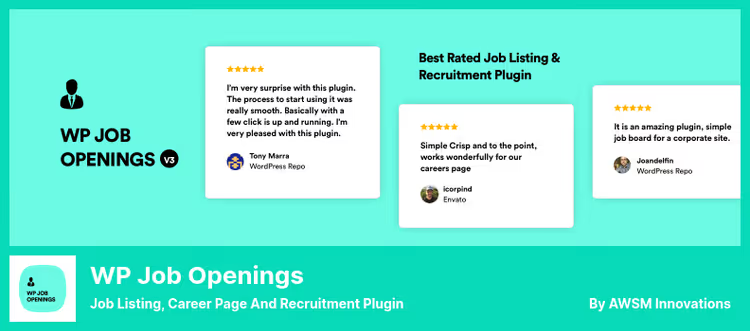
The loudest rebranding in the niche. The plugin known since 2018 as WP Job Openings, in 2026 turned into HireZoot (developer awsm.in) and received a major update to version 4.0.1. This isn't just a name change: the admin dashboard has been completely reworked, a native Gutenberg block for displaying jobs has been added, and three layouts instead of two, Grid, List and the new Stack.
From a user perspective, the key change is the Gutenberg block. You no longer need to copy shortcodes and paste them on a page: you go into the editor, add the "Job Listings" block, configure filters, colors and layout right in the editor sidebar, and get a styled job list. This is a huge step forward for those building sites on the block editor.
HireZoot retained everything people loved about WP Job Openings: unlimited job specifications, built-in application form, email notifications with customizable templates and structured data for SEO.
What's good:
- Gutenberg block with fine visual settings: colors, borders, margins, radii and three button styles, without a single line of CSS
- Three layouts: Grid, List and Stack, one-click switching
- Multi-select filters and front-end sorting, convenient for candidates
- 191 reviews and a rating of 4.8 on WordPress.org, the best score in the selection
What's disappointing:
- PRO Pack (premium) is sold separately, price not published on WordPress.org, need to check on hirezoot.com
- Version 4.0 was released in May 2026, there may be teething problems, watch for updates
- Old brand WP Job Openings is still mentioned in search engine cache, possible confusion for users
Verdict: if your site runs on the WordPress block editor (Gutenberg), HireZoot will be the most convenient plugin in the entire selection. For sites on Classic Editor it also fits, but the block magic is lost.
🔗 HireZoot on WordPress.org | 🔗 Official HireZoot website
5. JS Job Manager, recruiting powerhouse with credit system and maps
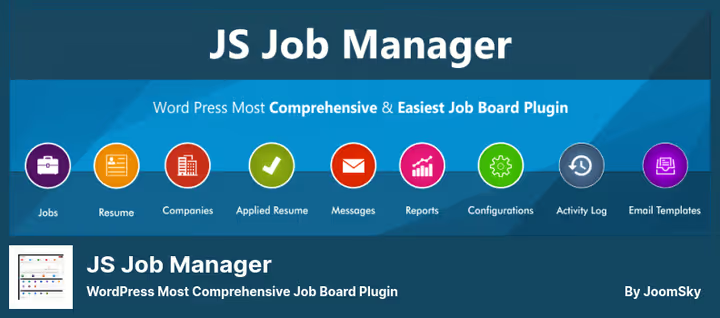
JS Job Manager by JoomSky is the most feature-packed plugin in the selection. It's closer not to a "job board" but to a full-fledged employment portal: there are candidate and employer dashboards, a credit system for paid publications, a built-in messaging system, geo-search by radius and custom login and registration pages.
The key difference of JS Job Manager: the candidate dashboard is available in the free version. A candidate registers, fills out a profile, uploads a resume and applies to jobs, all inside the plugin, without external services and extensions.
The plugin comes with 250+ settings in the admin panel: from enabling and disabling individual form fields to changing field order by drag and drop. For comparison, most competitors require editing functions.php or buying a premium version for such customization. Pro version for $29 (one-time payment) adds 45 shortcodes (versus 25 in free), a credit system with payment through PayPal and WooCommerce, and 19 front-end widgets.
However, this plugin has the lowest installation base in the selection: about 800 active users and a rating of 3.3 on WordPress.org. The latest reviews date back to 2023, users complained about errors and slow support. Version 2.0.2 was released in November 2025, but the developer's site is updated infrequently, there's a risk that critical security fixes will be delayed.
What's good:
- Candidate dashboard "out of the box", a rare feature for a free plugin
- Credit system: employers buy credit packages and spend them on publishing jobs, ready monetization mechanism
- 250+ configurations in admin panel, flexibility unavailable to competitors without additional plugins
- One-time Pro payment ($29), not annual subscription
What's disappointing:
- Only 800+ active installations and rating of 3.3, very small community
- Latest reviews (2023) are negative: users complain about errors and slow support
- Admin panel interface looks outdated compared to HireZoot or WP Job Manager
- Developer's site (joomsky.com) is rarely updated, there's a risk that the plugin won't receive timely security fixes
Verdict: JS Job Manager is chosen by those who need a built-in candidate dashboard and credit system "here and now," without assembling from extensions. But before installing, definitely test the plugin on a staging site: stability is not at WP Job Manager level.
🔗 JS Job Manager on WordPress.org | 🔗 Pro version on JoomSky
Visual tutorial on creating a job board with WP Job Manager in 9 minutes: installation, shortcode setup and launching your first job.
⁉️🤔 Frequently asked questions
Do I need to pay for a job board plugin if I only have 3-5 open positions?
No, the free versions of Simple Job Board, WP Job Manager and HireZoot are more than enough for a small number of jobs. You get publishing, receiving applications and email notifications without spending a penny. Paid versions and extensions make sense to connect when specific scenarios appear: paid publications from third-party employers, candidate dashboard or custom application statuses.
Which plugin works best with Gutenberg?
HireZoot (formerly WP Job Openings), starting with version 4.0.0, provides a native "Job Listings" block for the Gutenberg editor. You add the block to a page, configure layout (Grid, List or Stack), colors, filters and sorting right in the editor sidebar, no shortcodes needed. The other plugins from the selection work through shortcodes, which are also inserted in Gutenberg through the Shortcode block, but without visual configuration.
Can I set it up so employers publish jobs themselves on my site?
Yes, WP Job Manager and JS Job Manager support front-end job publication. An employer registers, fills out a form on the site (shortcode
[submit_job_form]in WP Job Manager, built-in form in JS Job Manager), and the job either publishes immediately or goes to moderation, depending on settings. JS Job Manager additionally gives the employer a dashboard to manage all their jobs.
Which plugin is the lightest in server load?
WP Job Manager is the most lightweight of the five. It doesn't load its own styles and scripts on pages without its shortcodes, and the plugin core is written with emphasis on minimalism (Automattic developers consciously don't include in core what can be moved to extensions). Simple Job Board and HireZoot also don't slow down the site, but load slightly more resources due to built-in filters and layouts.
What to do if the plugin doesn't inherit my theme's styles?
All plugins from the selection inherit basic styles of the active WordPress theme, but sometimes the result requires tweaking, especially if the theme uses a non-standard grid or custom fonts. Solution: add 5-15 lines of CSS in Appearance → Customize → Additional CSS. WP Job Manager and HireZoot have detailed documentation on element CSS classes. If you're not comfortable with CSS, hire a developer for an hour through WordPress Jobs, that time is enough to refine the appearance.
Which job board plugin to install for your task: final breakdown 2026
Five plugins cover fundamentally different scenarios, and the right choice saves hours of setup and dozens of dollars on unnecessary extensions. Here's a matrix for quick decision:
Simple job board for a company, take WP Job Manager. Code from Automattic, no vendor lock-in, tons of documentation and the largest community. If in six months you need a candidate dashboard or paid publications, just connect an extension without migrating to another plugin.
Need maximum application form customization, Simple Job Board with its field builder. 14 languages "out of the box" make it the best choice for international teams.
Site on Gutenberg, definitely HireZoot. Native block with visual settings in the editor sidebar beats everything competitors' shortcodes offer. Bonus: best rating in the selection (4.8) and fresh 2026 interface.
Small business, 2-3 jobs, Job Manager & Career. Minimum actions: shortcode on a page, and the board is ready. Free version covers everything a local cafe, salon or workshop needs.
Full portal with monetization, JS Job Manager for $29**. Credit system, dashboards for both sides and 250+ settings without a line of code. But first, mandatory testing on a staging site: stability is not at leader level.
Choose for your task, not for a loud brand, and the job board will work in an evening, not a week.

A professional team of writers and editors specializing in creating quality content.