














🚀 8 best plugins for WordPress import and export in 2026
Your WordPress site has been running for years, and the database is bloated with content: posts, pages, users, images, SEO meta, comments. Sooner or later you need to move this data somewhere: to a new host, a staging environment, export it to an accounting system, or migrate to another CMS. Doing it manually is slow and painful. phpMyAdmin is powerful, but not for everyone.
WordPress's built-in import/export tool works through XML and saves the day in simple scenarios: export content, upload it to another site. But it's a crude instrument. It doesn't allow selectivity (want only pages and comments? Too bad), doesn't pull images, and doesn't work with CSV.
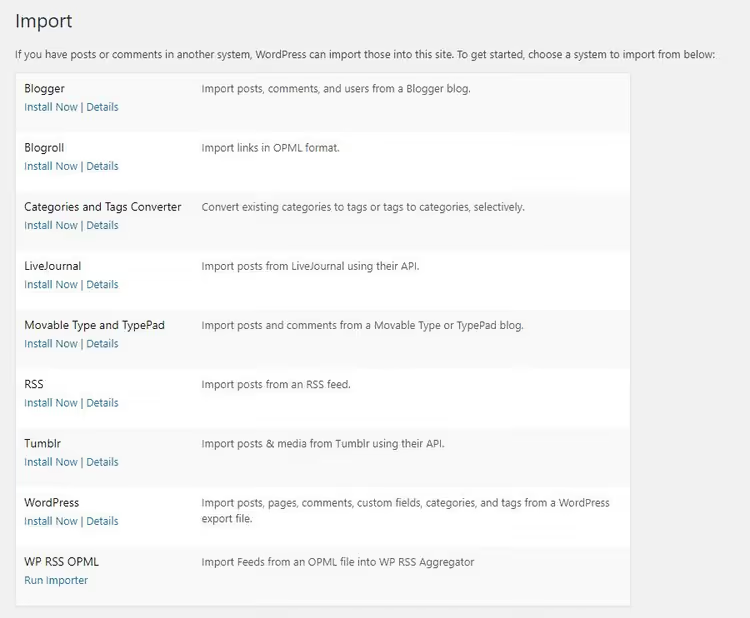
The built-in import interface looks ascetic: one screen, one button, no field mapping.
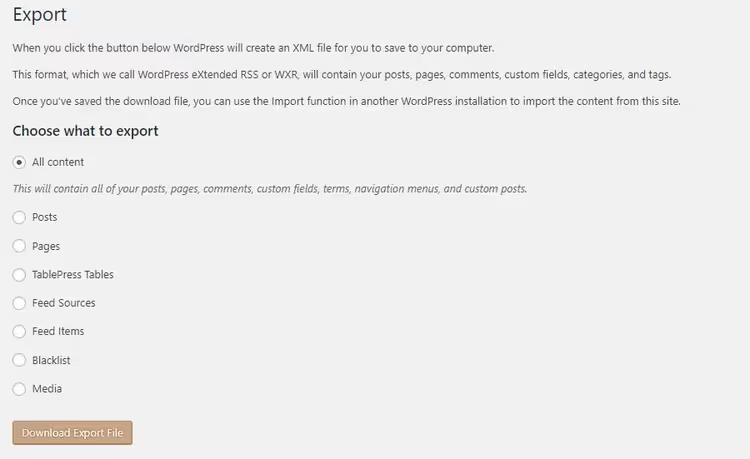
Import and export plugins cover exactly what the built-in tools lack: import from CSV, Excel, and Google Sheets, selective transfer of specific data types, batch updates, cron scheduling. Below are eight tested plugins for different scenarios: from full store migration to surgical URL export.
💡 Quick overview:
- Fire up WP All Import, load CSV/XML/Excel, and data lands in WordPress in four steps
- For WooCommerce stores, use Woo Import Export: products, orders, coupons, users, one plugin
- If you only need URL export or widget transfer, grab a specialized solution, don't overpay
Plugin | Formats | WooCommerce | Free version | Scheduling |
|---|---|---|---|---|
WP All Import | XML, CSV, Excel, Google Sheets | Yes (add-on) | Yes | Pro |
Ultimate CSV Importer | CSV | No | Yes | Pro |
Woo Import Export | CSV | Yes | No (premium) | Yes |
Widget Importer & Exporter | JSON (widgets) | No | Yes | No |
Customizer Export/Import | JSON (settings) | No | Yes | No |
Import Users from CSV with Meta | CSV (users) | No | Yes | Yes |
Export All URLs | CSV (URL) | No | Yes | No |
Export Media with Selected Content | Built-in export + media | No | Yes | No |
1. WP All Import
WP All Import is the most popular importer in the WordPress repository: 200,000+ active installations and over 1,500 five-star reviews. The plugin accepts XML, CSV, Excel, and Google Sheets without file structure requirements. The drag-and-drop interface walks you through four steps: upload, map fields, configure filters, run.
In practice, the main advantage is XPath filtering: from our experience, you can import not the entire file but only records matching a condition. Say, from a 10,000-product XML feed, extract only items in the "Electronics" category with a price above a certain threshold. The plugin splits large files into chunks automatically, avoiding memory limit crashes. Special characters (Arabic, Hebrew, Chinese) are handled correctly.
The Pro version adds: image import from URLs, file download from remote sources, cron import on schedule, PHP functions in templates, and tech support. A separate add-on covers WooCommerce product import: variable products, attributes, prices, stock.
Pros:
- All formats in one plugin, no conversion
- XPath filters for selective import
- Integration with ACF, JetEngine, Meta Box, WooCommerce, WPML
Cons:
- Pro license costs from $99/year
- Learning curve for XPath
🔗 WP All Import on WordPress.org🔗 Live demo
2. Ultimate CSV Importer

Ultimate CSV Importer specializes in regular import of large volumes. In a single pass, it pulls posts, pages, comments, reviews (WP Customer Reviews), SEO fields from All in One SEO, taxonomies, images from external URLs. Important detail: deduplication. The plugin checks content for duplicates and doesn't bloat the database.
The free version can do everything listed above, including multisites. Pro adds periodic updates without manual intervention, multilingual support, file manager, and detailed logs. For export, there's a separate add-on: data comes out in the same CSV format.
Pros:
- Content deduplication out of the box
- Image import from Pixabay/Shutterstock via URL
- Extensible through hooks
Cons:
- Interface overloaded with settings
- Export is a separate plugin
🔗 Ultimate CSV Importer on WordPress.org🔗 Live demo
3. Woo Import Export
Woo Import Export is a premium plugin for WooCommerce stores. No free version, but capabilities justify the price: import and export of products (variable and simple), categories, orders, coupons, users, and comments. Format is CSV, plus data extraction from external URLs.
Inside: preview before import/export, filters for selective transfer, cron scheduler, and full logging. WPML is supported, multilingual stores are not a problem. The plugin is sold on CodeCanyon with a 4.5+ rating and hundreds of sales.
Pros:
- Full WooCommerce coverage (products, orders, coupons, users)
- Scheduling and logs in standard package
- Data preview before launch
Cons:
- Premium only ($39 on CodeCanyon)
- No free version for testing
🔗 Woo Import Export on CodeCanyon
4. Widget Importer & Exporter

Highly specialized but irreplaceable when transferring themes. Widget Importer & Exporter exports widgets with settings to JSON, and on import intelligently handles conflicts: widgets without a specified area are excluded, existing ones are kept as inactive. After completion, you see a table with results for each widget.
The plugin is free, weighs less than 100 KB, and has no premium add-ons. For developers, there are filters to modify data before import.
Pros:
- Extremely simple: two buttons, Export and Import
- Safe import without losing settings
- Completely free
Cons:
- Widgets only, doesn't touch other content
- No scheduling
🔗 Widget Importer & Exporter on WordPress.org
5. Customizer Export/Import
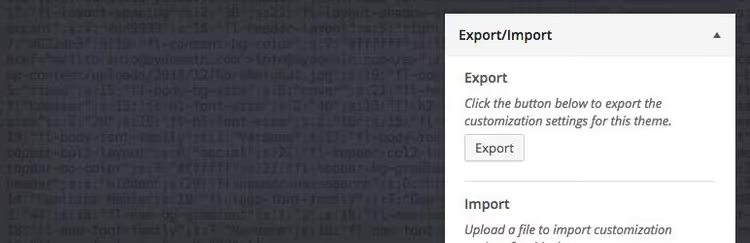
Transferred a theme and spent an hour configuring the customizer? This plugin solves the problem. Customizer Export/Import packages theme settings (colors, fonts, logo, CSS) into JSON directly from the customizer interface. Works only with themes using the WordPress Customizer API.
On import, you can exclude images, and developers can filter parameters through hooks. After completion, the page refreshes and changes are visible immediately. Limitation: exported settings only work for the same theme or a child theme.
Pros:
- Export and import in two clicks from the customizer
- Completely free
- Lightweight and doesn't burden the admin
Cons:
- Only themes with Customizer API
- Doesn't work between different themes
🔗 Customizer Export/Import on WordPress.org
6. Import Users from CSV with Meta
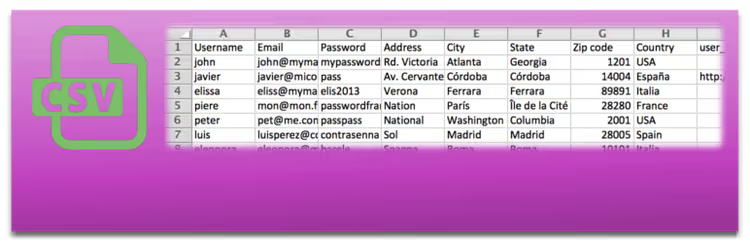
When you need to load thousands of users with role assignments, this plugin does exactly that. Import Users from CSV with Meta accepts CSV with any columns, maps them to WordPress profile fields, and creates accounts in seconds. Meta data (first name, last name, nickname) is supported automatically.
The plugin can send customized email notifications to new users, update existing records on schedule, and is compatible with most membership plugins (Membership, Restrict Content). Hooks for developers allow extending functionality.
Pros:
- Bulk import with role assignment
- Periodic user data updates
- Customizable email templates
Cons:
- Users only, no other content
- Spartan interface
🔗 Import Users from CSV on WordPress.org🔗 Live demo
7. Export All URLs

A minimalist tool for SEO audit and migration. Export All URLs creates a page with all site URLs: titles, categories, post types, status (published/scheduled). CSV export can be filtered by author and post type, and filenames can be randomly generated for data protection.
Convenient when setting up 301 redirects via htaccess or for quick content inventory before migration. No settings except choosing post types to export. 50,000+ active installations and a 4.5/5 rating confirm: the plugin does exactly what it promises.
Pros:
- Extremely simple: one page, all URLs
- Filtering by author and post type
- Completely free
Cons:
- URL export only, no content
- No scheduling
🔗 Export All URLs on WordPress.org
8. Export Media with Selected Content

Standard WordPress export ignores post images: only content is exported, while featured image and attachments remain on the old site. Export Media with Selected Content adds one checkbox to the export window. Check it, and the post's featured image and all attached media files come along.
No settings, no interface, just an extension of standard functionality. Lightweight, free, from WordPress.org repository. Updates regularly.
Pros:
- One checkbox, media files come with content
- Zero admin overhead
- Free and open-source
Cons:
- Only extends built-in export
- No separate settings
🔗 Export Media with Selected Content on WordPress.org
⁉️🤔 Frequently asked questions
Why are import plugins better than WordPress's built-in tool?
Built-in WordPress export only works with XML and transfers everything in bulk: posts, pages, comments, no choice. Plugins give selective import (pages only or products only), CSV/Excel/Google Sheets support, XPath filters, image transfer from URLs, and cron scheduling. For regular data work, the difference is like between a screwdriver and a power drill.
Can you import data from Google Sheets directly?
Yes, WP All Import supports direct import from Google Sheets. Copy the public table URL, paste it into the "Download a file" field, and the plugin recognizes columns automatically. Ultimate CSV Importer requires exporting Google Sheets to CSV first, then feeding it to the plugin.
Which plugin should I choose for WooCommerce?
If budget allows, Woo Import Export gives full coverage: products, orders, coupons, users in one interface. If you need a free start, WP All Import with the WooCommerce add-on covers most scenarios. Ultimate CSV Importer works for one-off CSV uploads without complex logic.
What to do with broken images during import?
WP All Import in the Pro version automatically pulls images from external URLs into the WordPress media library. Ultimate CSV Importer does this even in the free version. If you're importing through built-in export, definitely enable Export Media with Selected Content (plugin #8 in this list) so media files don't get lost.
Is there a risk of duplicating content on re-import?
Ultimate CSV Importer has built-in deduplication and checks content for duplicates before insertion. WP All Import uses a Unique Identifier mechanism: you assign an identifier field (for example, SKU for products), and the plugin updates existing records instead of creating duplicates. Without such configuration, duplicates are possible in any plugin.
What to install for your task in 2026
There's no universal plugin for all scenarios. WP All Import is the obvious choice for most: XML, CSV, Excel, Google Sheets in one interface, a huge knowledge base, and active support. Ultimate CSV Importer better handles regular import with deduplication. Woo Import Export is the only option for stores where you need to move not just products but orders and coupons too.
If the task is narrow, don't overpay. Widget Importer & Exporter and Customizer Export/Import cost zero and do exactly what their names say. Export All URLs is a must-have for SEO audit. Export Media with Selected Content is a tiny checkbox that saves hours of manual image transfer.
We recommend starting with the free versions of WP All Import and Ultimate CSV Importer: test both on a site copy and decide which interface suits you better. And if you're transferring a WooCommerce store, check out the WordPress clone and migration plugins roundup, which has tools for full site transfer, not just data.

A professional team of writers and editors specializing in creating quality content.