














⏱ Time to first byte: what is TTFB and how to improve it on WordPress
You clicked a link, and the browser just sits there. No page loading, no progress indicator, just a white screen and waiting. This isn't your internet speed or slow JavaScript. This is TTFB: the time it takes for the server to respond to the very first request.
TTFB determines when users will see anything on their screen at all. With slow TTFB, visitors leave before your site even begins to render. And starting in 2025, Google includes server responsiveness in its ranking signals Core Web Vitals.
Below you'll find what TTFB really is, the four components it consists of, and how to bring it down to a level where your site delivers the first byte faster than a user can blink.
💡 Quick overview:
- Understand what TTFB is and why every second of this delay multiplies across every visitor action.
- Walk through the chain of four factors: DNS, server, WordPress plugins, and HTML caching.
- Compare four scenarios with real Pingdom measurements, from 150 ms to a catastrophic 4.2 seconds.
- Enable HTML caching and see how a single plugin reduces TTFB dramatically without changing hosts.
What is TTFB and why it affects everything
The formal definition from Wikipedia: TTFB is the time from sending an HTTP request to receiving the first byte of the response in the client browser. It includes socket connection latency, request transmission time, and server processing time.
In simpler terms: TTFB is the pause between "clicking a link" and "something starts happening on the site." In gaming terms, it's latency, ping, the delay before the first response. Users see no header, no menu, no spinner, just an empty tab. The longer this pause, the higher the chance they'll close the tab.
An important nuance: TTFB affects more than just the initial page load. Every internal navigation, every click on a menu link, every click on an image within a post, each is a separate HTTP request with its own TTFB. A poor score multiplies across every reader action.
Four factors that make up TTFB
TTFB isn't a single metric but a sum of delays at each stage of the "user → site" chain. All four links work sequentially: if one slows down, the final result slows down too. Let's examine each one.
DNS: the first checkpoint
The browser doesn't know where your server is physically located until DNS converts the domain into an IP address. Good DNS servers with a distributed network of nodes do this in milliseconds, while poor ones add tens or hundreds of milliseconds to every page load.
Practical minimum: use Cloudflare or a similar service with global DNS caching. After the first request, the address stays in cache, and DNS latency disappears completely for subsequent requests.
Server and PHP: what happens at the host
Every request to an uncached WordPress page launches the PHP interpreter. The server loads the core, theme, and active plugins, executes their code, and only then delivers the HTML. Modern PHP versions handle this cycle much faster than releases from a decade ago, not to mention completely outdated branches.
Two hosting parameters determine speed: PHP version and the CPU time allocated to your plan. Cheap shared hosting with dozens of sites on one server and outdated PHP is a guaranteed path to TTFB > 1 second. Specialized WordPress hosting with PHP 8.2+ and built-in server-level caching delivers fundamentally different numbers.
WordPress plugins and theme
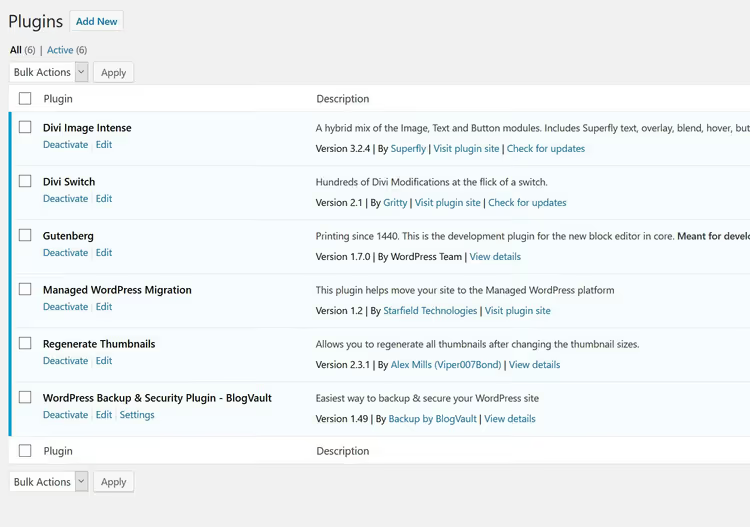
WordPress assembles pages from dozens of PHP files, and every active plugin adds its code to this process. Ten quality plugins from reputable developers may barely affect TTFB. One poorly written plugin that makes three extra database queries on every request can tank your entire site's speed.
Here's an example of a sensible plugin set, everything needed, nothing extra:
And this is already a potentially problematic configuration. Several dozen active plugins, and the server has to process each one when generating the page:
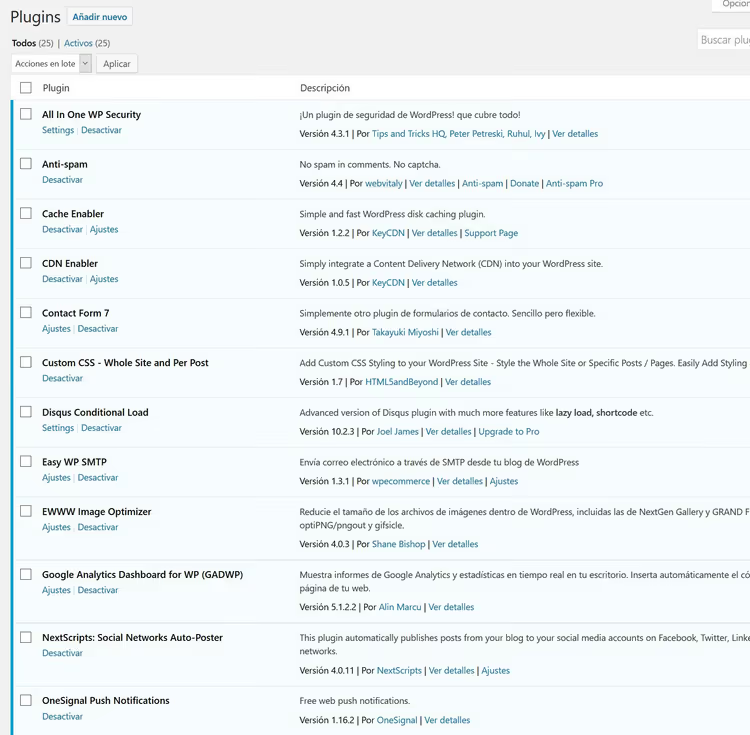
In practice, more than 30 active plugins almost guarantees high TTFB, even on good hosting. The rule is simple: each plugin should perform a specific task that can't be solved otherwise. Everything that's there "just in case" should be removed.
HTML caching: the main lever
The most powerful factor of all. A caching plugin like Cache Enabler saves ready HTML copies of pages to the server's disk. When a request comes in, the web server delivers a static file, bypassing the entire PHP and WordPress stack.
The result: the server no longer needs to load the core, theme, and plugins for every visitor. Only the web server itself (nginx or Apache) serves content directly. This is why caching provides the most significant TTFB reduction, by factors rather than percentages. We covered why nginx is more efficient than Apache for this task in a separate article.
TTFB in practice: four scenarios
Let's move to real measurements. Below are test results for different site and server combinations, obtained through Pingdom Tools. Each scenario shows TTFB for both uncached and cached versions.
Slow site on a slow server
The worst possible combination: a site with dozens of plugins and no caching on old shared hosting with PHP 5.4.
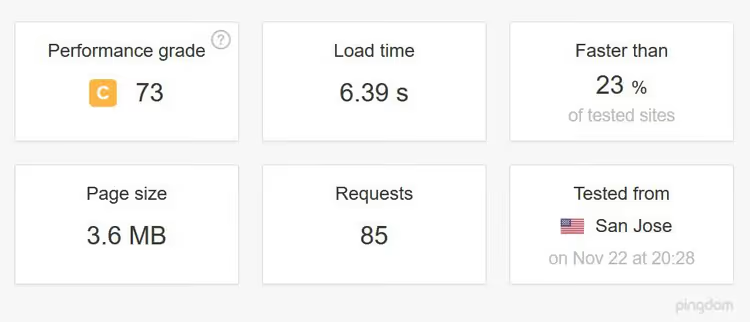
Let's expand the details of the first request, where you can see the server thinking for an eternity:
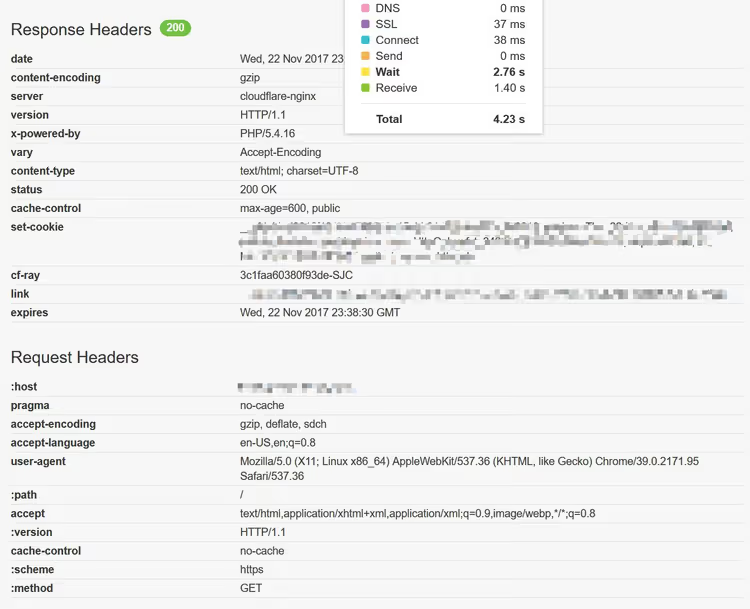
TTFB is 4.2 seconds. Four seconds of the user staring at a blank screen before the browser receives any data at all. Add page rendering time on top of that, and total wait time until the site is ready easily reaches seven seconds. Cloudflare at the front doesn't help here: the problem runs deeper, at the hosting and site code level.
Fast site on a medium server
Changing conditions: a site with minimal plugins, server on Apache with a standard PHP version, no caching.
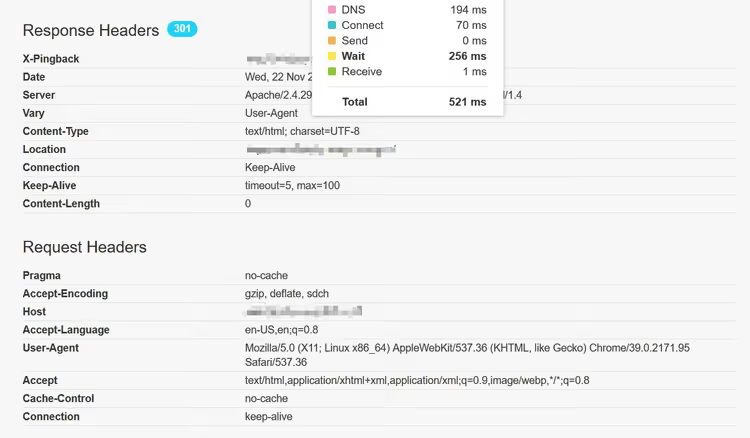
Result: 521 ms. Already 8 times better than the first scenario. Half a second to first byte, acceptable for most sites. Now let's enable caching:
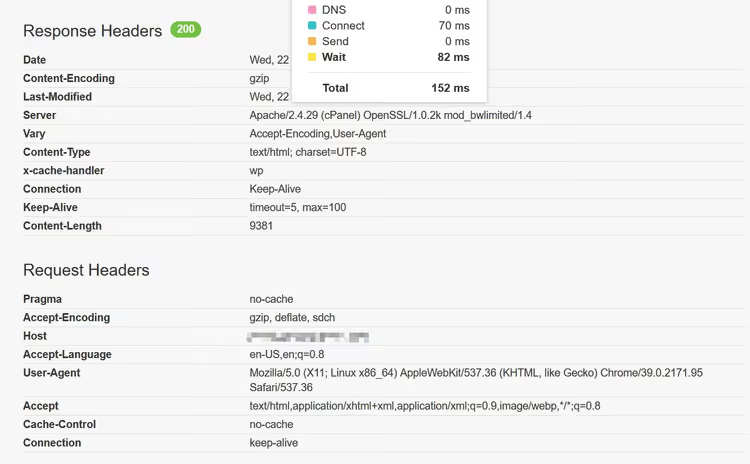
TTFB drops to 152 ms. Even medium hosting with properly configured caching delivers excellent results.
Slow site on a fast server
The reverse situation: an optimized server on Plesk with nginx and a standard PHP version, but a plugin-bloated site.
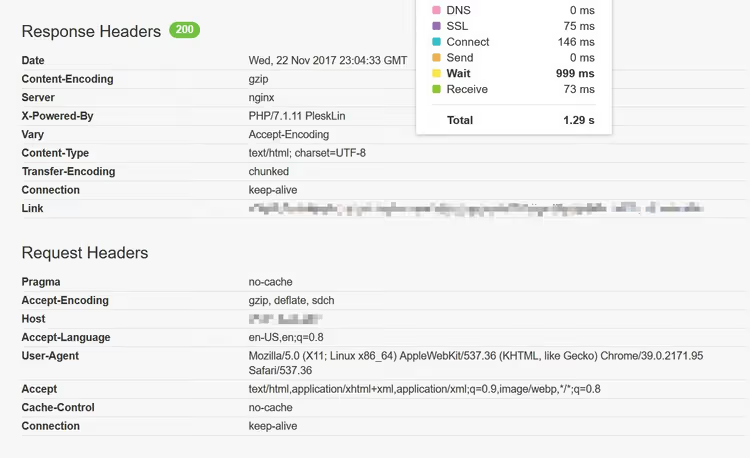
Without cache, the fast server still spends 1.29 seconds processing the heavy site. Good hosting mitigates but doesn't solve the problem of poorly optimized WordPress.
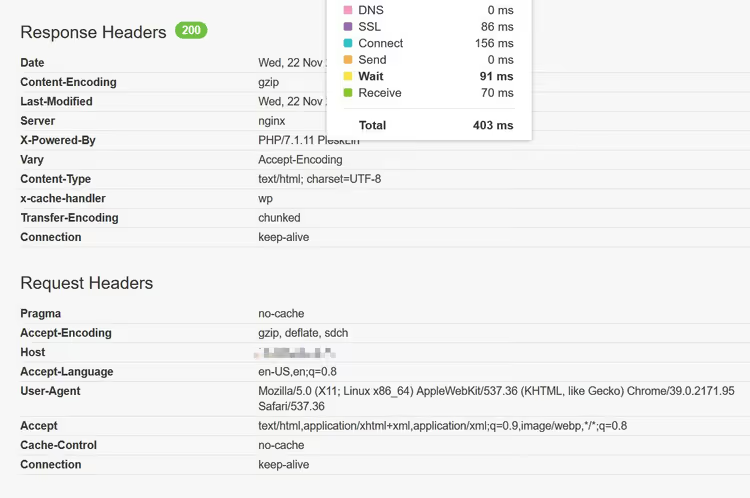
Enable caching, and TTFB drops to 400 ms. More than a threefold difference.
Fast site on a fast server
The optimal scenario: a lightweight site on good hosting.
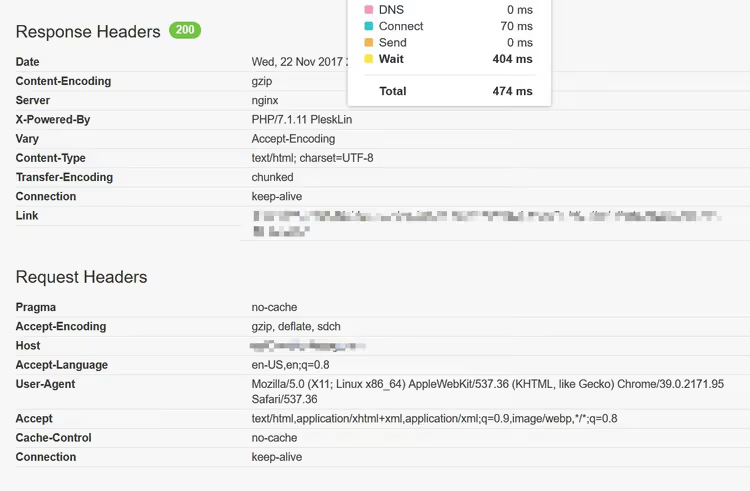
Without cache, the server delivers the first byte in under 500 ms. Add caching:
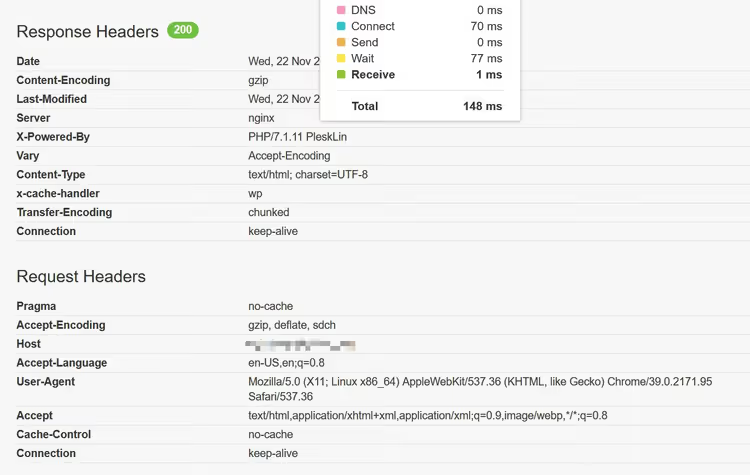
Result: under 150 ms. Virtually instant response.
Results summary
All four scenarios on a single chart:
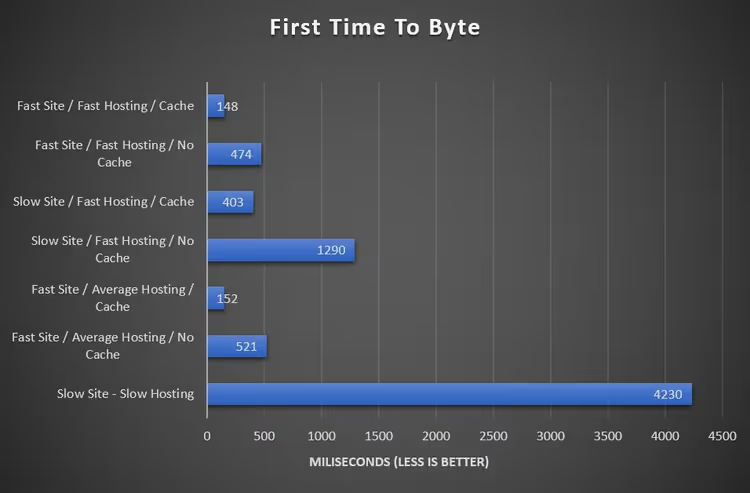
The conclusion from these measurements is straightforward: hosting matters, but what you do with the site itself affects TTFB more. A fast server with caching can pull even a problematic site to acceptable 400 ms, while a slow server without cache sinks even a lightweight WordPress.
How to improve TTFB: step-by-step plan
Optimization proceeds from simple to complex, from what takes five minutes and delivers maximum impact to finer adjustments.
Step 1: enable HTML caching. Install the free Cache Enabler or a similar caching plugin. This single action reduces TTFB dramatically on any hosting. Without exaggeration, the highest return per minute of effort in all of WordPress optimization.
Step 2: check your PHP version. In your hosting admin panel or cPanel, find the PHP version setting. If a current version is available (8.2 or newer), switch to it. Moving from an outdated branch to a modern one noticeably speeds up processing of every request. Before switching, make sure your theme and all plugins are compatible with the chosen version.
Step 3: audit your plugins. Disable everything not in active use right now. Keep only plugins that solve a specific task. Everything else should be deleted, not just deactivated. Plugins kept "for future use" or "might come in handy" add code to every request whether you use them or not.
Step 4: choose a fast theme. The theme determines how much PHP code executes on each page load. Heavy themes with visual page builders generate significantly more server work than minimalist solutions. If a TTFB test on a clean WordPress installation (no plugins, default theme) shows a good result, but the score drops sharply after activating your theme, the problem is the theme itself.
Step 5: evaluate your hosting. If TTFB still exceeds 500-800 ms after the first four steps, the limitation is on the hosting side. Specialized WordPress hosting with nginx, PHP 8.2+, and server-side caching delivers a fundamentally different response level. When choosing, look for built-in object caching (Redis or Memcached), which is the next level after HTML caching.
Video: TTFB from theory to results
Watch a visual breakdown of TTFB with live measurements before and after optimization:
⁉️🤔 Frequently asked questions
What TTFB is considered good for WordPress?
Use Google Core Web Vitals target values as your guide: up to 800 ms is acceptable, up to 500 ms is good, up to 200 ms is excellent. In practice, for a WordPress site with caching, the achievable range is 100-400 ms. Without caching, even a fast site rarely drops below 400-500 ms.
Is changing hosting mandatory to improve TTFB?
Not always. HTML caching reduces TTFB dramatically even on medium hosting. Before migrating, enable caching, update PHP to a current version, and clean up plugins. If TTFB is still above 800 ms after that, then it really is time to change hosting.
Why does TTFB vary from measurement to measurement?
TTFB is affected by server CPU load at the moment of measurement, network latency, and the geography of the test server. Take a series of 5-7 measurements and use the median, not the first random value. Test from multiple locations: a server in Europe may show excellent TTFB from Frankfurt but poor from Tokyo.
Does TTFB affect Google rankings?
Yes, starting in 2025, server responsiveness is part of Core Web Vitals as a ranking signal. The direct impact is moderate, but the indirect impact is significant: high TTFB increases bounce rate, and high bounce rate directly hurts rankings.
Can I measure TTFB for free?
Yes. Use Pingdom Tools, GTmetrix, PageSpeed Insights, or WebPageTest. Important nuance: measure specifically TTFB (time to first byte), not total page load time. In Pingdom, you need to expand the details of the first request to the site for this.
What to do about TTFB right now
The main takeaway from the measurements above: HTML caching is the most powerful and simplest lever. A single plugin reduces TTFB dramatically on any hosting, and it takes exactly five minutes.
The order of actions is as follows:
- If TTFB > 1 second, start with caching and updating PHP. These two steps provide most of the possible improvement.
- If TTFB is between 400 and 800 ms, a plugin and theme audit usually eliminates the remaining delay.
- If TTFB is consistently under 200 ms, you're in the optimal zone; maintain the current level.
Start with a free caching plugin: install, activate, and run a test through Pingdom Tools. You'll see the difference immediately. What's your current TTFB? Share your numbers in the comments.

A professional team of writers and editors specializing in creating quality content.