














💰 4 best donation plugins for WordPress in 2026
Accepting donations through a website starts with one question: a button or a full-fledged campaign? Some projects get by with a "Donate" link to PayPal, while others need fundraising goals, a donor database, tax receipts, and recurring payments. The difference is like that between a tip jar at the checkout and an annual charity auction.
The problem is that there are dozens of WordPress plugins, each promising "easy donation setup in 5 minutes." In practice, one is tied to Stripe and doesn't work with PayPal, another requires a premium add-on for receipts, and a third charges a fee on top of the payment gateway for every transaction. Choosing without testing is tricky.
We examined four working options: from the simplest button to a full-featured fundraising powerhouse. All four are actively maintained, updated in 2026, and have free versions on WordPress.org. We compared prices, features, and use cases so you can pick the one that solves your specific problem.
💡 Quick overview:
- PayPal Donations: a PayPal button with no extra setup, shortcode, 5 minutes to launch.
- WP Simple Pay: card payments via Stripe with a live form, Apple Pay and Google Pay support.
- GiveWP: full-featured fundraising with goals, a donor database, and reports, 100,000+ installs.
- Charitable: a budget-friendly alternative to GiveWP with the same capabilities, plus peer-to-peer fundraising.
Comparison table: four plugins in 30 seconds
Criterion | PayPal Donations | WP Simple Pay | GiveWP | Charitable |
|---|---|---|---|---|
Primary gateway | PayPal | Stripe | Stripe, PayPal, Square | Stripe, PayPal, Square |
Free version | Yes | Yes (Lite) | Yes | Yes |
Campaign goals | ❌ | ❌ | ✅ | ✅ |
Donor database | ❌ | ❌ | ✅ | ✅ |
Recurring payments | ❌ | ❌ | Pro ($399/year) | Plus ($99/year) |
Peer-to-peer | ❌ | ❌ | Elite ($599/year) | Pro ($199/year) |
Tax receipts | ❌ | ❌ | ✅ | ✅ |
Starting price (paid upgrade) | Free | $49.50/year | $199/year (Essentials) | $69/year (Basic) |
Active installs | 70,000+ | 100,000+ | 100,000+ | 10,000+ |
Last updated | March 2026 | May 2026 | May 2026 | June 2026 |
Now let's walk through each plugin: what's inside, how it looks, and what use case it's designed for.
1. PayPal Donations, a "Donate" button without the extras
PayPal Donations works on a "one button, one payment" principle. No forms, campaigns, or donor database. Just accepting money through PayPal.
After installation, go to "Settings → PayPal Donations" and fill in four fields: your PayPal account email, currency, default amount, and button style. That's it.
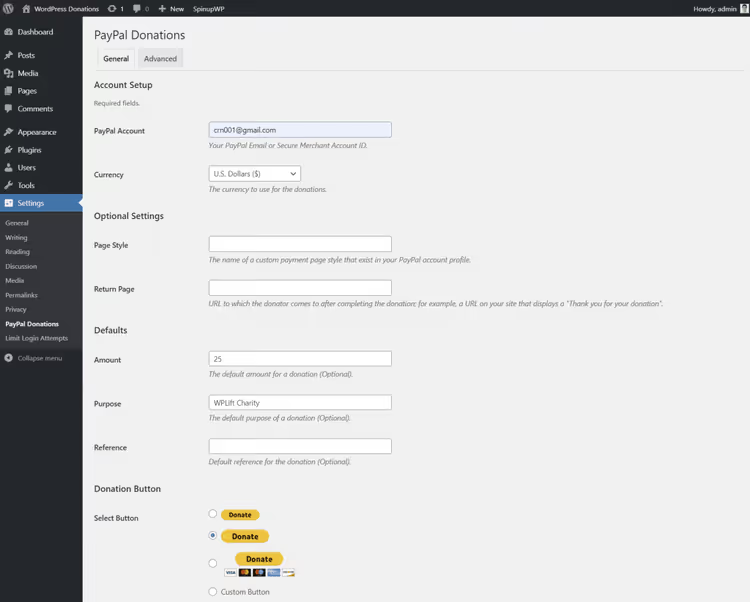
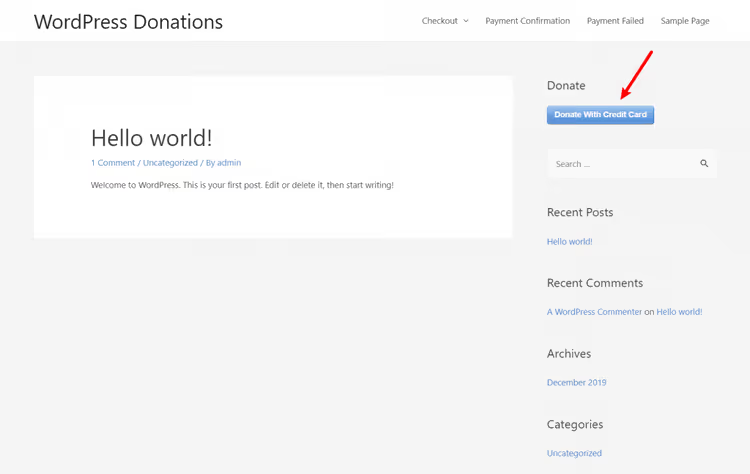
Place the finished button with the shortcode [paypal-donation] anywhere: in a sidebar widget, in the body of a post, or via the Shortcode block in the editor. Here's how it looks in the sidebar:
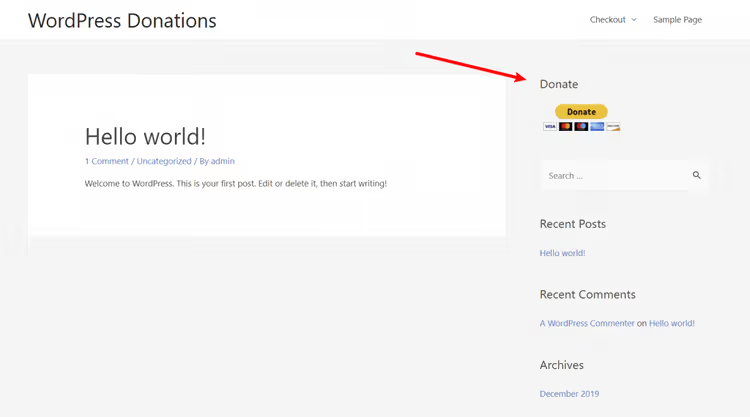
Pros: ultra-fast setup, no Stripe account needed, free forever. Cons: PayPal only, no donor tracking, no way to set a fundraising goal. The shortcode supports parameters for customizing the button for a specific campaign, but this doesn't make it a full-fledged fundraising tool.
In our experience, if you just need a "Support the project" button for a blog or personal site, install PayPal Donations and forget about it. The plugin has been around since 2010, receives regular updates, and there's nothing to break.
🔗 PayPal Donations on WordPress.org
2. WP Simple Pay, accepting payments via Stripe with a live form
WP Simple Pay does the same thing as PayPal Donations, but for Stripe. The difference: it provides a full payment form, not just a button. You can set fixed amounts, a custom value, a payment description, and button design.
After activation, the plugin offers a Stripe connection wizard. Click "Connect with Stripe," log into your account (or create a new one), and within a minute your site is accepting cards.
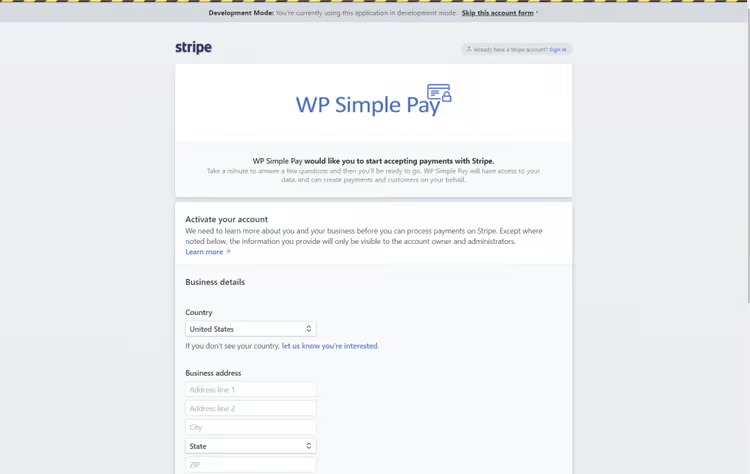
Next, go to "Simple Pay Lite → Add New," set the amounts in the Payment Options tab, and configure the button appearance. For example, "Donate by card":
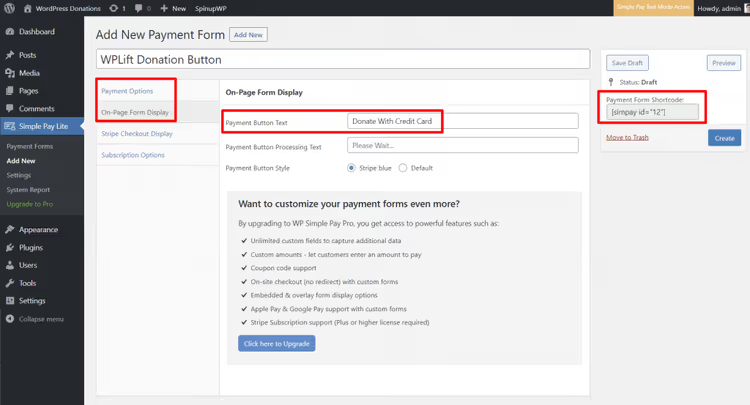
The output is a shortcode you can insert anywhere. On the front end, a form with amount selection and card fields appears right on the page:
A nice bonus: the Lite version is free and doesn't add any fees on top of Stripe. The standard 2.9% + $0.30 is charged by Stripe itself. The paid Personal tier ($49.50/year) adds recurring payments, Apple Pay and Google Pay, custom form fields, and an option for donors to cover processing fees.
Choose WP Simple Pay if your audience pays by card and PayPal isn't essential. Stripe provides a smoother UX: the payment doesn't redirect to an external site, everything happens in a form on your own page.
🔗 WP Simple Pay on WordPress.org🔗 Documentation and pricing
3. GiveWP, a fundraising powerhouse for serious needs
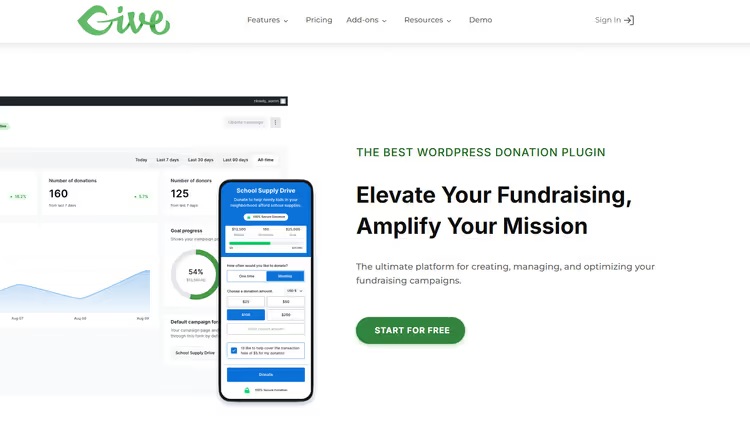
GiveWP takes donation acceptance to a fundamentally different level. This isn't just a button or a form; it's a complete environment: campaigns with goals, a donor database, reports, tax receipts, and dozens of add-ons for any use case.
The free core includes: unlimited donation forms, goals with progress bars, multiple gateways (Stripe, PayPal, Square), a donor database with payment history, PDF receipts, and basic reporting. In our experience, this is already enough for most nonprofit and charitable websites.
Paid tiers as of June 2026 (source): Essentials at $199/year adds text-to-give and offline donations. Pro at $399/year unlocks recurring payments, fee recovery, integrations with Mailchimp, Constant Contact, Zapier, Salesforce, and 15+ international gateways. Elite at $599/year includes peer-to-peer fundraising (donors create their own fundraising pages), tributes, and WooCommerce donation upsells.
In practice, GiveWP excels when you're not running a one-time collection but systematic work: multiple simultaneous campaigns, donor segmentation, automated email sequences. However, the interface is feature-rich: a newcomer will need an hour or two to get comfortable. The learning curve is perhaps the only drawback compared to the simpler plugins in this review.
An important note: GiveWP is owned by Nexcess/Liquid Web. This means commercial support with no hosting dependency. The plugin works on any WordPress host, and your donor data belongs to you and only you.
🔗 GiveWP on WordPress.org🔗 Pricing and demo
4. Charitable, the same power at a lower price
Charitable follows the same path as GiveWP but with different positioning: "all the same features for less money." Functionally, the free versions are nearly identical: campaigns with goals, donor database, reports, receipts, multiple gateways.

Where Charitable pulls ahead:
Recurring payments are available on the Plus tier for $99/year, compared to $399 for GiveWP. Peer-to-peer fundraising is on Pro for $199 per year on Pro, compared to $599 for GiveWP. The price difference is twofold at each level, while the feature coverage is comparable. Plus, Charitable includes built-in donor leaderboards, a visual form builder, and DonationGuard bot protection, all included in the respective tiers at no extra cost.
Charitable pricing as of June 2026 (source): Basic ($69/year), core fundraising, donor database, PDF receipts. Plus ($99/year), recurring payments, fee recovery, email marketing. Pro ($199/year), peer-to-peer, crowdfunding, teams, Stripe Connect. Elite ($299/year), 5 sites, multisite, premium support.
The downside of Charitable: the add-on ecosystem is smaller than GiveWP's. If you need a specific gateway (for example, iDEAL or Giropay), check the integrations list in advance; GiveWP's is broader. For the main use cases (Stripe + PayPal + receipts + recurring payments), Charitable covers everything.
🔗 Charitable on WordPress.org🔗 Charitable pricing
Video: setting up GiveWP in 10 minutes
If you'd like to see the plugin in action after reading the description, here's a step-by-step tutorial in English, from installation to your first campaign:
⁉️🤔 Frequently asked questions
Do I even need a donation plugin if I can just provide a link to PayPal?
Yes, if you want at least minimal control. A bare link won't show how much has been raised, won't tell you who donated, and won't provide a receipt. A plugin like PayPal Donations adds all this at the cost of 5 minutes to install. Plus, a button on the site converts better than a link in the footer.
Does WordPress charge a fee on donations through plugins?
No. WordPress as a platform doesn't add its own fees. Only the payment gateway charges a fee: Stripe, 2.9% plus 30 cents, PayPal, roughly the same (varies by country). The plugins themselves (all four from this review) have no built-in transaction fees in their free versions.
Can I use GiveWP and Charitable at the same time?
Technically yes, but you shouldn't. Both plugins solve the same problem and will conflict over the same data (forms, donors, gateways). Choose one. If you already have one installed and want to switch to the other, both support donor export/import via CSV.
Which plugin should I choose for a one-time collection toward a specific goal?
If the collection is one-time and the goal is singular, go with Charitable Basic for $69/year or the free GiveWP core. Both provide a goal, progress bar, campaign deadlines, and receipts. WP Simple Pay will also work (via a fixed amount), but without visual progress tracking and without a donor database.
What if I need donations in cryptocurrency?
None of the four plugins natively support crypto. For crypto donations, look at specialized solutions: NowPayments, CoinGate, Blockonomics. You can integrate them separately without touching your main donation plugin.
So which plugin should I choose in the end?
In short, here's a selection matrix: if you're a freelancer, blogger, or small site and you just need a single "Donate via PayPal" button, install PayPal Donations. Free, reliable, 5 minutes. If you accept cards and want a form with amount selection on your own page, your choice is WP Simple Pay. Stripe integration, clean UX, the free Lite version covers most needs. If you're a nonprofit organization with multiple campaigns, a donor database, and reporting requirements, GiveWP. Market leader, 100,000+ installs, powerful add-on ecosystem, commercial support from Nexcess. If you need the same functionality as GiveWP but at half the price, Charitable. The same feature set at each level, lower price, peer-to-peer available starting at $199/year. All four plugins are actively maintained, updated in 2026, and have free versions on WordPress.org. Install the one that matches your needs on the "button → campaign → fundraising" scale. And don't overcomplicate things: if a PayPal button is enough, don't buy Charitable Pro for features you won't use.

A professional team of writers and editors specializing in creating quality content.