














⚙️ 8 best WordPress helpdesk plugins in 2026
Customers don't wait. When payment breaks on your site or the order form stops working, the first half hour of silence costs you money. An email going nowhere, frustration, a lost order, a scenario familiar to every WordPress store owner.
A ticket system inside the WordPress admin solves the problem at its root. Instead of collecting requests from email, Telegram, and comments, you get a unified panel: all inquiries, assigned agents, statuses, and priorities. No email gets lost, the customer sees the conversation history, and you get a report on response speed.
We tested and selected the 8 best WordPress support service plugins: from lightweight free solutions to powerful all-in-one systems with AI and WooCommerce integration. Each covers its own scenario. Some need a simple ticket tracker in 5 minutes, while others need a Zendesk-level helpdesk, but inside their own site.
💡 Quick overview:
- Decide on the plugin type, simple ticket tracker, knowledge base, or full helpdesk with AI
- Install the plugin through the WordPress admin in 5 minutes, the setup wizard will guide you through the steps
- Add agents, create categories, and configure ticket priorities
- Set up email notifications and response templates to reduce reaction time
- Connect integrations with WooCommerce, EDD, and IMAP email to fit your business processes
Plugin comparison table
Plugin | Free version | WooCommerce | AI / chat | Active installations |
|---|---|---|---|---|
WSDesk | ❌ (from $49/year) | ✅ | ❌ | Commercial |
Richpanel | ✅ (wp.org) + SaaS from $29/month | ✅ (core) | ✅ (AI + live chat) | 2,000+ |
Knowledge Base | ✅ (wp.org) | ❌ | ❌ | 4,000+ |
WooCommerce Support Ticket | ❌ ($39 one-time) | ✅ (core) | ❌ | Commercial |
Awesome Support | ✅ (wp.org) | ✅ (add-on) | ❌ | 6,000+ |
Fluent Support | ✅ (wp.org) | ✅ (Pro) | ❌ | 10,000+ |
SupportCandy | ✅ (wp.org) | ✅ (add-on) | ✅ (AI copilot) | 10,000+ |
JS Help Desk | ✅ (wp.org) | ✅ (add-on) | ✅ (AI copilot) | 8,000+ |
1. WSDesk, ELEX helpdesk inside WordPress
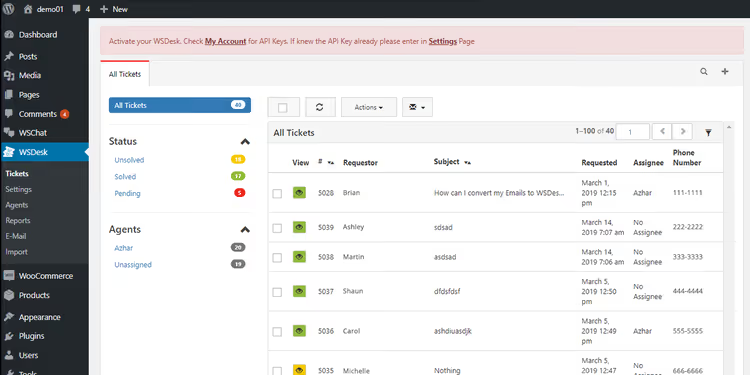
WSDesk from ELEX, a commercial helpdesk that lives completely inside your WordPress. No external SaaS subscriptions: customer data and correspondence are stored on your server, you don't share them with anyone.
The setup wizard walks you through basic configuration in a couple of minutes. Next, you add agents (unlimited, no extra charge per seat), create departments, and start receiving tickets. No limit on the number of inquiries, the plugin doesn't cut functionality as load grows.
Email handling deserves special mention: WSDesk can fetch unread messages via IMAP or Google OAuth and turn them into tickets automatically. The customer writes to moc.etisruoy@troppus, the ticket creates itself, the agent gets a notification.
Pros: WooCommerce and Easy Digital Downloads integration out of the box, shortcodes to display forms anywhere, XML backup, reports on agents and tickets.
Cons: no live chat (only email tickets), the interface is sometimes overloaded with settings.
Price: from $49/year for 1 site. No trial version.
2. Richpanel, helpdesk, chat, and CRM for WooCommerce
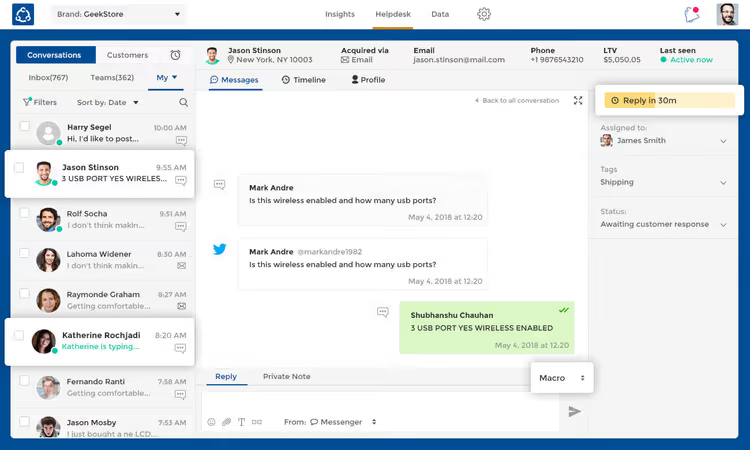
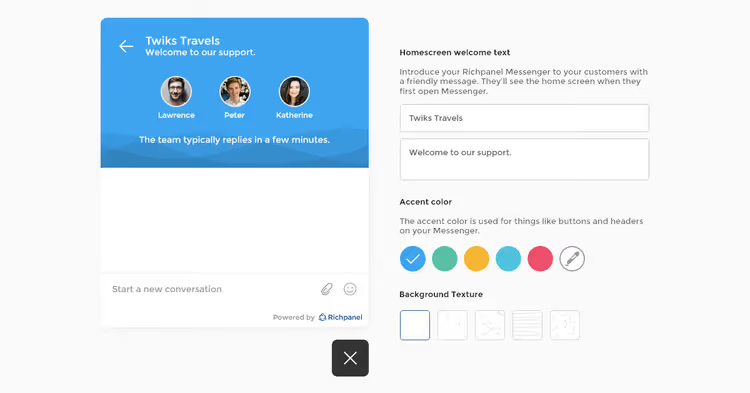
Richpanel, a SaaS platform that connects to WooCommerce through a free WordPress plugin and collects all support channels into one interface: email, live chat, Facebook, and WhatsApp. For a WooCommerce store, this is the most advanced option in the selection.
The plugin pulls the customer's order history and shows the agent full context: what was purchased, when, for how much, whether there were returns. Support stops being blind, the agent sees the problem before the customer describes it.
The main feature, Self-Service Portal: most common requests (where's my order, how to return, change address) the customer closes themselves through guided scenarios. Agents only connect for complex cases.
Pros: AI-powered response automation, custom macros, prioritization by departments and keywords.
Cons: the free plugin is just a bridge to SaaS. The plan starts at $29 per month, which is noticeable for small businesses. The plugin hasn't been tested with the last three major WordPress versions.
Price: from $29/month (SaaS). Plugin on WordPress.org is free.
🔗 Richpanel on WordPress.org | 🔗 Richpanel website
3. Knowledge Base, knowledge base and self-service center

Not every request requires a live person. Often the customer just needs to find instructions, and Knowledge Base from WebberZone gives them this opportunity. The plugin builds a multi-level knowledge base with products, sections, articles, and tags right inside WordPress.
The idea is simple: the more answers the customer finds themselves, the fewer tickets land in the support queue. Reducing routine work without hiring additional agents.
The plugin comes with responsive templates, breadcrumbs, live AJAX article search, and automatic table of contents. Supports Gutenberg blocks and shortcodes, the knowledge base can be embedded on any page. WPML and Polylang out of the box: translate articles, sections, and products into needed languages without additional plugins.
The Pro version adds article ratings, a floating help widget (search, suggested articles, and contact form in one popup), and advanced permalink settings.
Pros: free, lightweight, multilingual, caching out of the box.
Cons: no ticket system (knowledge base only), a second plugin is needed for a full helpdesk.
Price: free. Pro, from $49/year.
🔗 Knowledge Base on WordPress.org
4. WooCommerce Support Ticket System, tailored for stores
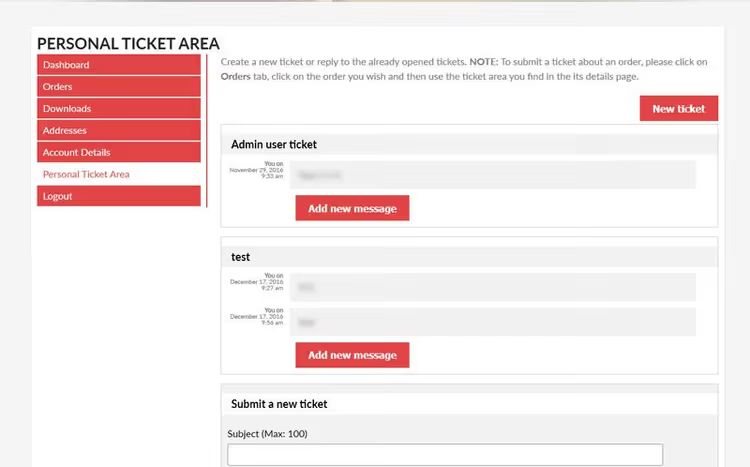
This plugin from Vanquish (an elite CodeCanyon author with 20+ WooCommerce extensions) does exactly what it promises: ties tickets to orders. The customer sees a "Create Ticket" button right in the order card, no need to search for a support form on a separate page.
The administrator works with tickets in the familiar WooCommerce interface: assigns agents, changes statuses, priorities, sees the entire customer history. No separate dashboard or third-party interface, everything inside wp-admin.
Shortcodes allow placing the support form anywhere, and tabs on user and admin pages make ticket access instant. For a store already living in the WooCommerce ecosystem, this is the most organic way to add a support system.
Pros: deep WooCommerce integration, clean interface without training, one-time payment.
Cons: no live chat, no knowledge base, no AI, only tickets for orders.
Price: $39 one-time (CodeCanyon).
🔗 WooCommerce Support Ticket System on CodeCanyon
5. Awesome Support, powerful free helpdesk
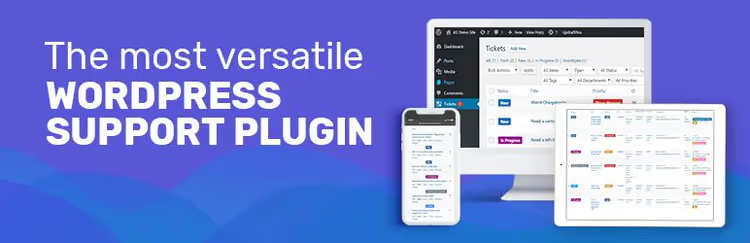
Awesome Support, one of the oldest and most feature-rich free helpdesks for WordPress: 6,000+ active installations, 194 reviews, tested with WP 7.0. Developers position it as a WordPress alternative to Zendesk and HelpScout, and it's easy to believe when you see the feature list.
The free core provides: unlimited tickets, file attachments, custom fields, multiple products and departments, REST API, GDPR mode, and basic agent time tracking. The plugin adds "Submit Ticket" and "My Tickets" pages automatically, but you can move forms anywhere with a shortcode.
The addon ecosystem, the richest among all participants in the selection: Email Piping (email replies), Paid Support (paid tickets), Satisfaction Survey (customer surveys), SLA (service level agreements), Smart Agent Assignment (automatic agent assignment by 5 algorithms), and two dozen more addons. With bundles, the discount reaches 80%.
Pros: powerful free foundation, huge addon park, familiar WordPress UI without learning curve.
Cons: some key features (email piping, WooCommerce integration), only in paid addons. The interface looks a bit archaic compared to newer plugins.
Price: free (core). Addons, from $15 to $149/year, bundles, from $179/year.
🔗 Awesome Support on WordPress.org
6. Fluent Support, fast and modern ticket tracker

Fluent Support, one of the fastest-growing helpdesks in the WordPress repository: 10,000+ active installations, 65 reviews, tested up to WP 7.0. Developers from the Fluent team (authors of FluentSMTP, FluentCRM, and Fluent Forms) bet on interface speed and simplicity, and hit the mark.
The plugin loads tickets via AJAX without page reload. Agents work in real time: they see who's responding to a ticket, don't overlap, and don't duplicate responses. Integration with WooCommerce, EDD, TutorLMS, FluentCRM, and a dozen other plugins, right out of the box, including in the free version.
Advanced features (email piping, canned responses, SLA, ticket queues, reports), in Pro, but even the free core covers small business needs completely: unlimited agents and tickets, custom fields, automation triggers, internal notes.
Pros: very fast AJAX interface, rich free integration (WooCommerce, EDD, LMS), active development.
Cons: no live chat, AI is planned but not yet implemented.
Price: free. Pro, from $99/year.
🔗 Fluent Support on WordPress.org
7. SupportCandy, open-source AI helpdesk

SupportCandy, the second most popular free helpdesk in the WordPress directory after Awesome Support: 10,000+ active installations, 287 reviews. But the main difference, AI Copilot availability already in the free version. The neural network helps agents formulate responses, selects ready templates, and automatically classifies incoming tickets.
The ticket management system, classic and solid: creation from frontend and admin, agent assignment, priorities, statuses, custom fields, CSV export. Out of the box, 20+ ready email templates for notifications and WooCommerce integration through a free addon.
The support interface is customizable: colors, logo, form fields. Guest tickets without mandatory user registration speed up inquiries. Addons (SLA, Satisfaction Survey, Email Piping, Knowledge Base) are installed as needed, without bloating the core.
Pros: built-in AI Copilot for free, 20+ email templates, customization without code.
Cons: some features (Email Piping, KB), through paid addons. Performance on weak hosting can drop.
Price: free. Addons, from $29/year.
🔗 SupportCandy on WordPress.org
8. JS Help Desk, AI assistant and ticket system in one package

JS Help Desk covers the "want Zendesk, but inside WordPress and with a one-time payment" scenario. 8,000+ active installations, 73 reviews. The plugin offers a full ticket system with AI Copilot: the neural network helps agents respond faster, suggests formulations, and classifies inquiries.
Guest tickets allow customers to contact without registration. Email Piping fetches emails and turns them into tickets. The built-in knowledge base gives users the ability to find answers themselves, and agents can attach articles to tickets instead of long explanations.
The Pro version adds SLA timers, ticket queues, advanced analytics, and WooCommerce integration. Unlike SaaS competitors, a one-time payment, no monthly charges.
Pros: AI Copilot, Email Piping, knowledge base in one plugin, one-time payment.
Cons: tested up to WP 6.9.4 (not 7.0), WooCommerce pro features require a separate addon.
Price: free (basic). Pro, from $69 one-time.
🔗 JS Help Desk on WordPress.org
Step-by-step Fluent Support ticket system setup in WordPress in 15 minutes: plugin installation, creating agents, connecting email, and launching the first ticket.
⁉️🤔 Frequently asked questions
How does a support service plugin differ from a contact form?
A contact form (WPForms, Contact Form 7) just sends an email, like leaving a note on a desk. A support service plugin creates a ticket with a number, status, priority, and conversation history, like opening a tech support request with a tracking number and SLA. The customer sees all their inquiries in their personal account, the agent is assigned to the ticket, the administrator gets a report on response speed. For a site with 5+ inquiries per week, the difference becomes critical within a month.
Can I use a free plugin for a serious store?
Yes. Awesome Support and Fluent Support in the free version provide unlimited tickets and agents, REST API, and custom fields, enough for a store with 20-50 orders per day. Paid addons (Email Piping, WooCommerce integration, SLA) are purchased selectively when a specific need arises. In our experience, most small WooCommerce stores live on the free core for the first six months and connect exactly one addon, Email Piping. That's enough to stop losing emails and start responding to customers in 4 hours instead of 2 days.
Is a knowledge base needed if there's a ticket system?
A knowledge base significantly reduces the number of tickets, the customer finds the answer themselves and doesn't create an inquiry. But it doesn't replace tickets for individual situations: returning a specific order, payment issue, custom request. In practice, the "Knowledge Base + Fluent Support" combination covers the vast majority of small and medium business scenarios: customers with common questions go to the knowledge base, complex cases land in tickets, agents don't waste time on copy-pasting instructions.
What to do if a plugin stops updating?
Check the WordPress.org page before installation. The "Development" tab shows the last update date. A plugin without updates for more than 2 years, a candidate for replacement. If your current support plugin stopped updating, migrate to Fluent Support or SupportCandy. Both have tools for importing tickets from CSV, and the migration process takes less than an hour. Don't wait for a critical vulnerability in unsupported code.
Which plugin to choose if the budget is zero?
Fluent Support or Awesome Support. Both are free, both provide unlimited tickets and agents. Fluent Support wins on interface speed and built-in integrations (WooCommerce, EDD, out of the box, no addons). Awesome Support wins with the addon ecosystem: when the business grows, functionality is expanded with addons without migrating to another plugin. Start with Fluent Support if you have WooCommerce and admin panel speed is important. Choose Awesome Support if you plan to grow and need confidence that any future support scenario can be purchased as an addon.
What to choose for your task in 2026
There are many plugins, but the choice comes down to three scenarios.
If you have a WooCommerce store and the budget allows, Richpanel (#2). It provides full customer context, live chat, and AI automation. Support stops being a cost center and starts working on retention.
If the budget is limited but you want a modern interface, Fluent Support (#6). Free core with WooCommerce out of the box, instant AJAX interface, and 10,000+ satisfied users. Best start for small business.
If you need maximum flexibility for growth, Awesome Support (#5). Free foundation, 30+ addons, REST API, import from Zendesk and HelpScout. A system that won't hit the ceiling in a year.
For those who want a knowledge base without a ticket system, Knowledge Base (#3), free and multilingual. And if AI is critical, SupportCandy (#7) or JS Help Desk (#8) with built-in AI Copilot already in the free versions.
Try two plugins in parallel on a test site. 15 minutes in each, and you'll know exactly which interface fits your team. And when you choose, don't forget to configure notifications: the most functional helpdesk is useless if agents don't learn about a new ticket in time.

A professional team of writers and editors specializing in creating quality content.