














✅ 8 best WordPress team showcase plugins in 2026
A website without faces loses before the visitor finishes the first paragraph. Clients buy from people, not logos: they need to see who will do the work, what experience the team has, and whether they can trust these people at all.
An "About Us" page with three paragraphs of text doesn't solve this problem. For a small business of 3-5 people, you can code the cards manually. But when the team grows, departments appear, and employees reach twenty, manual HTML/CSS updates become endless headaches. Added someone? Fix the markup. Someone left? Fix it again.
The WordPress ecosystem offers dozens of plugins for team showcases, from lightweight free solutions to powerful premium builders. We selected 8 of the best: each one has been verified for relevance in 2026 and solves its own task, from a simple shortcode to a visual builder with department filtering.
💡 Quick overview:
- Choose a plugin for your task: Team Members works for freelancers, AWSM Team for agencies, Team Builder or WPS Team for large companies with departments.
- Set up employee profiles: photo, position, social links, and bio are filled in the WordPress admin panel in a couple of minutes per person.
- Place the showcase on your site: via shortcode, Gutenberg block, Elementor widget, or WPBakery builder.
Plugin | Price | Layouts | Builder | Active inst. |
|---|---|---|---|---|
JetElements Team Member | from $199/year | 40+ widgets | Elementor | 100K+ (Crocoblock) |
Creative Team | $49 (one-time) | 6 layouts | WPBakery | CodeCanyon |
AWSM Team | Free / Pro $29 | 3 presets + 5 Pro | Gutenberg | 3,000+ |
Team Builder | $39 (one-time) | 5 themes | WPBakery | CodeCanyon |
Team Members | Free / Pro €29 | 3-5 per row | Shortcode | 20,000+ |
Team Grid | $39 (one-time) | Grid + table + pager | WPBakery | CodeCanyon |
WPS Team | Free / Pro from $29 | 22+ themes | Gutenberg + Elementor | 10,000+ |
TLP Team | Free / Pro $39 | 8 layouts | Elementor + Gutenberg | 100,000+ |
1. JetElements, team widget for Elementor

🔗 JetElements on Crocoblock | 🔗 Team Member widget demo
Elementor is the number one page builder for WordPress. But its standard widgets aren't always enough. JetElements from Crocoblock adds 42 new widgets, including Team Member, a tool for creating employee cards of any complexity.
The widget offers fine-tuned customization: employee photo, name, position, social links, and hover effects. You can make a black-and-white photo that becomes color on hover, or replace static images with animated GIFs. Cards are assembled into a grid with customizable spacing and columns.
- Pros: full integration with Elementor, visual customization without code, 40+ hover effects.
- Cons: only available as part of Crocoblock (from $199 per year for All Inclusive), doesn't work without Elementor.
- Price: from $199/year (All Inclusive plan: 18 Jet plugins, 50+ templates, premium support). JetElements is not sold separately.
2. Creative Team, creative layouts for showcases

This premium plugin focuses on visual creativity. Six responsive layouts: mosaic, square and circular grids, slider, wave animation, and hexagon. Layouts switch in the control panel without touching code.
Colors are customized through palettes: rows, headings, names, backgrounds. Employee order changes with drag and drop. Each employee can have unlimited skills and social links. The plugin works with WPBakery Page Builder, supports Font Awesome and RTL languages.
- Pros: unique layouts (hexagon, wave), flexible color customization, WPBakery compatibility.
- Cons: premium only ($49 on CodeCanyon), no free version to test, hasn't been updated in a while (last confirmed update: 2020).
- Price: $49 (one-time, single site license).
3. AWSM Team, free with Pro upgrade

🔗 AWSM Team on WordPress.org | 🔗 Free version demo
AWSM Team is a lightweight and flexible plugin, updated in February 2026 (v1.3.5, tested up to WP 6.9.4). After installation, an AWSM Team section appears in the admin sidebar. First you create employee profiles: name, description, photo, contacts. Then you assemble them into teams and output via shortcode.
The free version provides three presets: card (4 styles), table (3 styles), and list (2 styles). Each is customizable via CSS. The plugin is responsive with touch support, working with both Gutenberg and the classic editor.
- Pros: genuinely functional free version, clean design, English documentation.
- Cons: only 3,000+ active installations, smaller community than competitors.
- Price: Free (wordpress.org) / Pro $29 (one-time).
Upgrading to AWSM Team Pro
The Pro version adds 5 additional presets, multiple style variations for each, and priority developer support. WPBakery compatibility appears: you can insert the showcase visually into any theme.
4. Team Builder, team showcase with department filtering
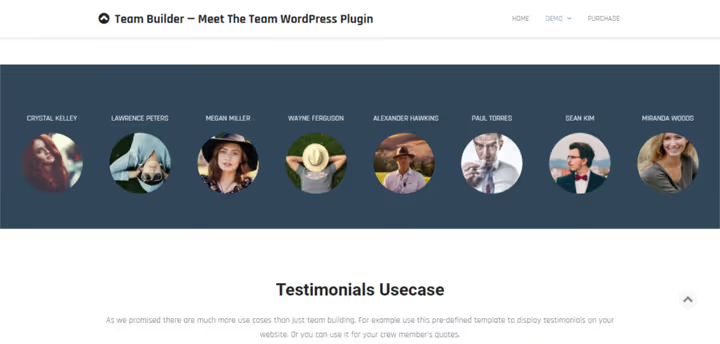
Team Builder is a powerful team showcase constructor with a visual editor, WPBakery support, and a shortcode system. It can display employees in a grid, table, slider, or widget. Five built-in themes with sliding panels provide a ready background.
The main feature is tag filtering: visitors filter employees by departments or teams. Skills display as progress bars or stars. An employee card includes email, phone, Skype, website, bio, tagline, and location. Data can be saved as contacts, convenient for HR pages and corporate portals.
- Pros: employee filtering, rich cards with contacts, 5 styling themes.
- Cons: premium only ($39 on CodeCanyon), admin interface looks outdated, hasn't been updated in a while.
- Price: $39 (one-time).
5. Team Members, free minimum, Pro for flexibility

🔗 Team Members on WordPress.org
Team Members by WP Darko is the most popular free plugin in this roundup: 20,000+ active installations, updated in 2026 (v5.4.1). A "Teams" section appears in the admin: you add employees with photo, position, bio, and links to three social networks. The shortcode copies and pastes onto any page.
The free version is not limited: 1 to 5 employees per row, customizable colors, random or manual order. The plugin is fully responsive and PHP 8 compatible.
- Pros: completely free without restrictions, 20,000+ installations, simplicity.
- Cons: only 3 social networks per employee in the free version, HTML in bio is not supported.
- Price: Free (wordpress.org) / Pro €29 (one-time).
Upgrading to Team Members Pro
🔗 Team Members Pro on WP Darko | 🔗 Pro demo
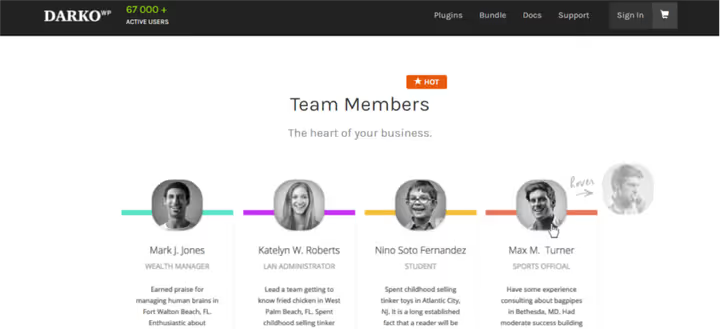
The Pro version extends the free one: a second photo on hover, an expandable block with additional information, photo filters, choice of square or circular avatars, individual colors for each employee, up to 5 social networks, and card height alignment.
6. Team Grid, grid, table, and thumbnail pager
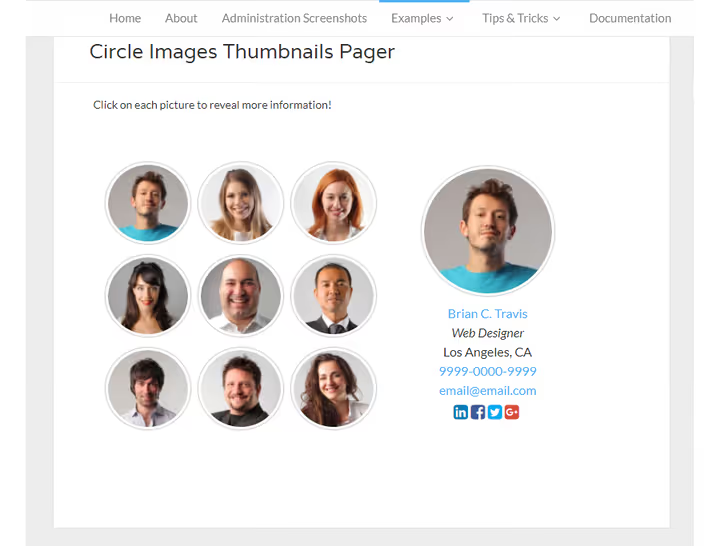
The plugin displays any content as a grid or table and is optimized for team showcases. Dozens of layout combinations are assembled through the settings panel without code. Grids are responsive: employee information can display immediately or only on hover.
The main feature is the thumbnail pager layout: small previews expand to full size on click. Ideal for large teams with limited screen space. Employees are categorized and filtered by department or position. WPBakery compatibility allows dragging the showcase onto a page visually. Each employee gets their own page with full information.
- Pros: unique thumbnail pager layout, categorization and filtering, individual employee pages.
- Cons: premium only ($39 on CodeCanyon), interface may seem complex for beginners.
- Price: $39 (one-time).
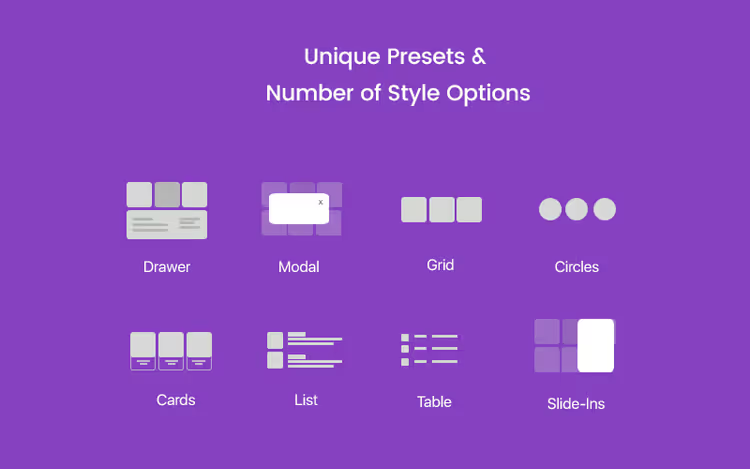
7. WPS Team, filters, modals, and panels for large teams

WPS Team by WPSpeedo is an actively developed plugin (v4.1.0, May 2026) with the richest set of display options in this roundup. Grid, slider, table, filterable catalog, Isotope grid, and for each layout 22+ styling themes to choose from. Color, font (1400+ Google Fonts), and spacing customization requires no code, using a visual shortcode builder.
The main advantage is card click options: modal window, sidebar panel, slide-out drawer, or redirect to a separate employee page. The Pro version adds AJAX pagination, infinite scroll, Isotope filtering by groups, locations, and specializations, plus 10 taxonomies for employee categorization. The plugin works with Elementor, Gutenberg, and Divi.
- Pros: 22+ themes, modals and side panels, 10 taxonomies for filtering, compatibility with three builders.
- Cons: Isotope filter and AJAX pagination only in Pro, free version doesn't include modal windows.
- Price: Free (wordpress.org) / Pro from $29 (one-time).
8. TLP Team, mass-market free plugin for Gutenberg and Elementor

TLP Team by RadiusTheme is the most widely used plugin in this roundup: over 100,000 active installations, consistently updated (v5.0.16, May 2026, tested up to WP 6.9). Eight unique layouts (carousel, grid, filterable grid, slider, list, Isotope grid) cover any scenario from a small agency to a corporate portal.
The plugin fully supports Elementor and Gutenberg: the showcase inserts as a block with settings in the sidebar. The Pro version adds custom fields, 20+ social networks, detailed employee pages, and import/export.
- Pros: 100,000+ installations, 8 layouts in the free version, Elementor and Gutenberg out of the box.
- Cons: detailed employee pages only in Pro.
- Price: Free (wordpress.org) / Pro $39 (one-time).
A short video on setting up a team showcase plugin: a 5-minute visual demonstration will save an hour of configuration.
⁉️🤔 Frequently asked questions
Do I need a plugin for a team showcase if I can code it manually?
For a team of three, no. But when you have 10+ employees and they change, manual HTML/CSS updates consume hours. A plugin provides a form in the admin: fill in photo, name, position, links, and the card is ready. An employee leaves, you delete the entry in the admin, and the card disappears from the site automatically.
Which plugin should I choose for a small business using Elementor?
If Elementor is your primary builder, go with TLP Team or JetElements. TLP Team is free, offers 8 layouts and Elementor integration out of the box, with 100,000+ installations. JetElements (Crocoblock) provides 42 widgets and maximum customization, but costs a $199 annual subscription.
Are free plugins inferior to premium versions?
Not always. Team Members by WP Darko in the free version has no employee count limits. Only social links are restricted (3 instead of 5) and there's no second photo on hover. AWSM Team in the free version provides 3 presets with several styles each, which is enough for most business websites.
What should I do if a plugin conflicts with my theme?
Three steps: (1) check the browser console (F12 → Console) for JavaScript errors; (2) temporarily switch to the default Twenty Twenty-Five theme. If the conflict disappears, the problem is with your theme, so contact the developer; (3) use a plugin that supports standard WordPress hooks (AWSM Team, Team Members, TLP Team), as they conflict less frequently.
Which plugin is suitable for a large corporate team with departments?
WPS Team is the best choice: 10 taxonomies for categorization, filtering by groups and specializations, modal windows and side panels for viewing profiles. Team Builder is an alternative with rich cards (email, phone, Skype) and tag filtering. If budget is limited, TLP Team with its filterable grid and carousel works well.
Which team showcase plugin should you choose in 2026?
You can address the need to "show the team on a WordPress site" in different ways, and budget isn't the main factor. Free Team Members and TLP Team cover the vast majority of small and medium business scenarios. AWSM Team wins with clean design and simple setup. If you're already in the Elementor ecosystem, JetElements provides maximum flexibility without changing tools.
For corporate sites with department hierarchies and dozens of employees, look at WPS Team (taxonomies, modal windows, filtering) or Team Builder (rich cards, department tags). And if you need the most widely used, actively supported, and completely free option, TLP Team with 100,000+ installations will handle the task with room to spare.
Choose a plugin for your ecosystem and team size, not for the longest feature list. Test the free version before buying: each of the listed plugins offers a working free version or live demo.

A professional team of writers and editors specializing in creating quality content.